IP Address Format and Function: IPv4, IPv6 and CIDR Explained
An IP address looks simple, four numbers with dots between them, but the structure hides most of what makes networking work. Part of the address names the network and part names the device on it, and the line between the two moves depending on a setting called the subnet mask. Once you can read that, subnetting, firewall rules, cloud network ranges and routing tables stop being mysterious. This guide covers the format of IPv4 and IPv6 addresses, what the slash notation means, and how to work out how many devices fit in a network.
The IPv4 format
An IPv4 address is 32 bits long. To make it readable, the 32 bits are split into four groups of 8 bits, called octets, and each octet is written as a decimal number from 0 to 255, separated by dots.
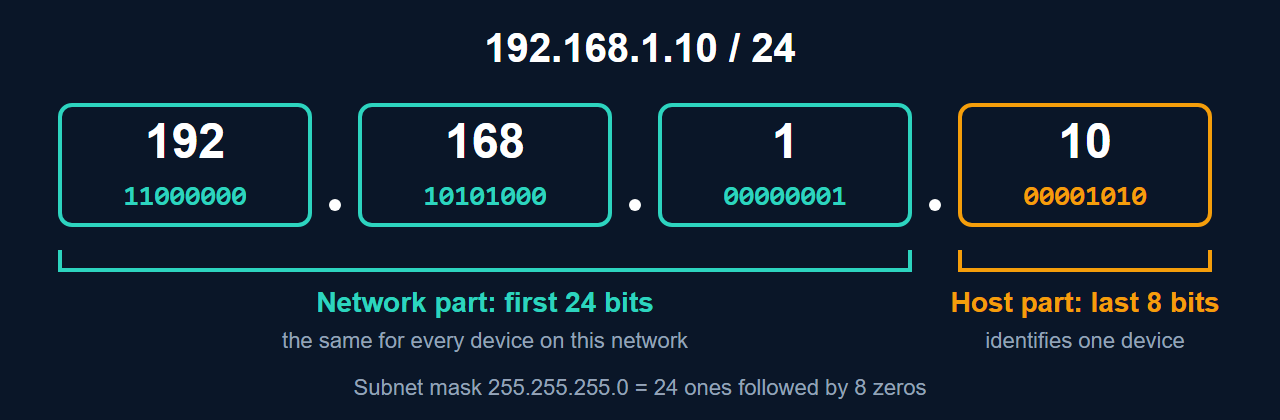
The address 192.168.1.10 is really this in binary: 11000000.10101000.00000001.00001010. Each octet is 8 binary digits, and 8 bits can hold any value from 0 to 255.
Network part and host part
Every address is split into a network portion, shared by every device on the same network, and a host portion, unique to one device. Two devices are on the same local network when the network portions of their addresses match; if they do not, traffic between them goes via a router.
The split is shown by the subnet mask or, more commonly today, by the prefix length after a slash. This is called CIDR notation (Classless Inter-Domain Routing):
192.168.1.10/24 = address 192.168.1.10, subnet mask 255.255.255.0The /24 means the first 24 bits are the network and the remaining 8 bits are the host. In this example the network is 192.168.1.0 and any address from 192.168.1.1 to 192.168.1.254 is a host on it.
How many hosts fit in a network
With n host bits, a network has 2n addresses. Two of them are reserved: the first is the network address itself (all host bits 0) and the last is the broadcast address (all host bits 1). So the number of usable host addresses is 2n minus 2. (Two special cases: a /31 is used on point-to-point links with both addresses usable, and a /32 is a single address.)
| Prefix | Subnet mask | Host bits | Usable hosts |
|---|---|---|---|
| /8 | 255.0.0.0 | 24 | 16,777,214 |
| /16 | 255.255.0.0 | 16 | 65,534 |
| /24 | 255.255.255.0 | 8 | 254 |
| /28 | 255.255.255.240 | 4 | 14 |
| /30 | 255.255.255.252 | 2 | 2 |
You can check any of these in seconds with Python’s standard library:
import ipaddress
net = ipaddress.ip_network("192.168.1.0/24")
print(net.netmask, net.broadcast_address, net.num_addresses)
print(list(net.hosts())[0], list(net.hosts())[-1])ip_network("192.168.1.0/24")builds a network object from the CIDR notation.net.netmaskprints the mask (255.255.255.0),net.broadcast_addressthe last address, andnet.num_addressesthe total (256).net.hosts()yields the usable addresses, so the first and last are192.168.1.1and192.168.1.254.
Address classes: history you may still see
Early IPv4 divided the address space into fixed classes: Class A (first octet 1 to 126, with a /8 network), Class B (128 to 191, /16) and Class C (192 to 223, /24), plus Class D for multicast and Class E as reserved. This wasted addresses, because organisations had to take a network of one of just three sizes. In 1993 classless addressing (CIDR) replaced it, so that a network can have any prefix length. Classes still appear in textbooks and certification exams, but real networks and routers use prefix lengths, not classes.
The IPv6 format
An IPv6 address is 128 bits, written as eight groups of four hexadecimal digits separated by colons: 2001:0db8:0000:0000:0000:0000:0000:0001. Two rules shorten it: leading zeros in a group can be dropped, and one run of all-zero groups can be replaced with ::. The example above becomes 2001:db8::1.
IPv6 also uses prefix notation. A typical home or office subnet is a /64, where the first 64 bits are the network prefix and the last 64 bits identify the interface. The range 2001:db8::/32 is set aside for documentation, which is why it appears in examples like these and never on the real internet.
Reading an address at a glance
- Starting 10., 172.16. to 172.31., or 192.168.: a private address, not routed on the public internet.
- 127.x.x.x: loopback, this computer.
- 169.254.x.x: IPv4 link-local, often a sign that a device could not get an address from DHCP.
- 224.x.x.x to 239.x.x.x: multicast.
For what each of these means in practice, see what is an IP address, and for how addresses are assigned, static vs dynamic IP addresses.
Common questions
Why are there 254 usable addresses in a /24 and not 256?
Because the first address (all host bits zero) names the network itself and the last (all host bits one) is the broadcast address used to reach every host at once. Neither can be given to a device.
What is a subnet mask actually doing?
A device applies the mask to its own address and to a destination address. If the results match, the destination is on the same network and is reached directly. If they differ, the device consults its routing table, and the packet normally goes to the default gateway.
Do I need to learn to subnet by hand?
It is a useful skill for exams and for understanding cloud network design, but in daily work a subnet calculator or the Python snippet above is quicker and less error-prone. Know what the numbers mean and let the calculator do the arithmetic.