Network Topologies Explained: Bus, Star, Ring and Mesh
A network topology is the shape of a network: which devices are connected to which, and how. The choice affects cost, speed, how easy the network is to extend, and above all what happens when something breaks. Some of the classic topologies (bus, ring) are now mostly history lessons, while others (star, mesh) describe networks you use every day, from your home Wi-Fi to the internet backbone. This guide explains each one in plain language, with its strengths and weaknesses, and shows which ones you will really meet today.
Two terms first: nodes and packets
A node is any device attached to the network: a computer, a phone, a printer, a switch or a router. A packet is a small chunk of data with the sender’s and receiver’s addresses attached; a message is broken into packets, sent across the network and reassembled at the other end. Topology describes how the nodes are linked so that packets can get from one to another.
There are two ways to describe a topology. The physical topology is how devices and cables are actually laid out. The logical topology is how data flows. The two can differ: an old Ethernet network built with a hub was physically a star but logically a bus.
Bus topology
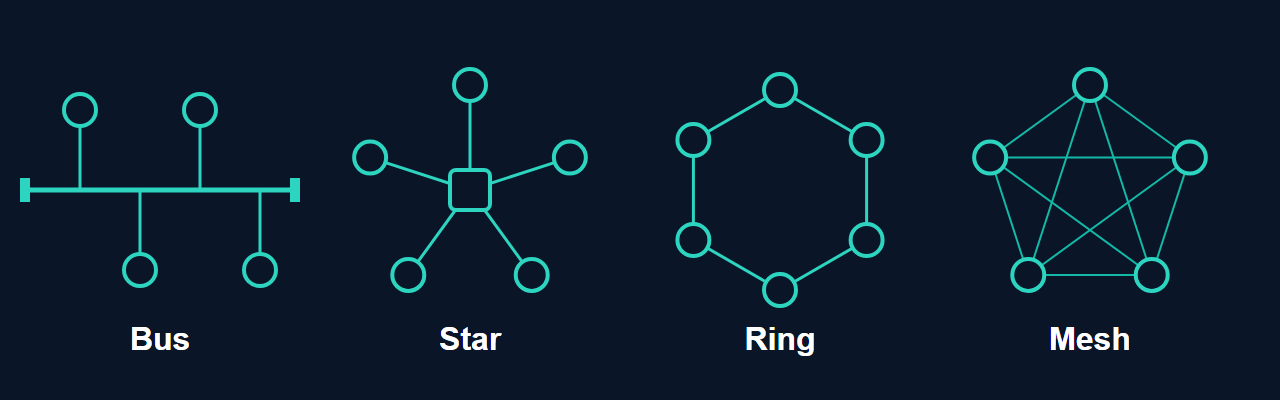
In a bus, every node connects to a single shared cable (the backbone), with terminators at both ends. Early Ethernet (10BASE5 and 10BASE2 over coaxial cable) worked this way. It needs little cable and is cheap, but everything shares one medium, so collisions grow as more devices are added, a break in the cable can split the network, and finding a fault means checking the whole run. It has been replaced in practice by star networks.
Star topology
In a star, every node connects to one central device, today a switch (earlier a hub). This is by far the most common topology for wired local networks: the cable to each desk goes back to a switch in a wiring cupboard. Wi-Fi is also logically a star, with the access point at the centre. The advantages are that adding or removing a device does not affect the others, a broken cable takes down only one device, and faults are easy to find. The drawback is that the central device is a single point of failure: if the switch dies, everything connected to it goes down. Larger networks solve this with redundant switches and uplinks.
Ring topology
In a ring, each node connects to exactly two neighbours, forming a loop, and data travels around it. Token Ring (IBM, standardised as IEEE 802.5) and FDDI were the best-known local implementations, and both are obsolete in offices. Rings live on in telecommunications: many metropolitan and carrier networks are built as fibre rings, so that if a link breaks, traffic can go the other way round the ring. The weakness of a simple ring is that one broken link or node can interrupt everyone unless the ring is dual or protected.
Mesh topology
In a mesh, nodes have multiple links to other nodes. In a full mesh, every node connects directly to every other; with n nodes that needs n(n-1)/2 links, which grows quickly (10 nodes need 45 links). A partial mesh connects only some nodes directly. The result is excellent resilience where alternative paths exist, because traffic can take another path if a link or node fails (a partial mesh can still contain single points of failure). The cost is more cabling, ports and configuration. The internet itself is a partial mesh of networks, wireless mesh Wi-Fi systems use the idea, and data-centre networks use many redundant paths between switches. Mesh is the topology you choose when reliability matters more than cost.
Tree and hybrid topologies
A tree (or extended star) connects several star networks to a central backbone, which is how most office networks look: access switches on each floor connect up to distribution and core switches. A hybrid topology simply combines several types. Real networks are nearly always hybrids, for example stars in each building linked in a partial mesh between buildings.
Comparing them
| Topology | Strengths | Weaknesses | Where you see it |
|---|---|---|---|
| Bus | Cheap, little cable | Shared medium, hard to troubleshoot, a cable break can take down the segment | Historic Ethernet |
| Star | Easy to manage and extend, faults are contained | Central device is a single point of failure | Home, office and Wi-Fi networks |
| Ring | Predictable, can protect against a single break | A simple ring is fragile, extending needs care | Carrier and metro fibre networks |
| Mesh | Very resilient, multiple paths | Costly and complex | Backbones, WANs, data centres, Wi-Fi mesh |
| Tree / hybrid | Scales to large networks, mixes strengths | Higher layers concentrate traffic and risk | Corporate campuses |
Choosing a topology in practice
For a home or small office, the answer is a star: one router with a built-in switch and Wi-Fi, plus cables for anything that needs to be fast. For a bigger site, a hierarchical design with redundant links gives you a star’s simplicity with protection against a single failure. For connecting sites where downtime is expensive, a partial mesh gives multiple paths. Cabling cost, the impact of a failure, room to grow and how much management effort you can afford should decide the design, not a diagram from a textbook.
To see how your own traffic reaches a destination, tracert example.com on Windows or traceroute example.com on Linux lists the routers along the path (some do not answer, so the list can have gaps), which is a useful reminder that the internet is a mesh of many independent networks. For the devices that build these networks, see networking devices from hubs and switches to routers and modems.
Common questions
Which topology is used in most homes?
A star. Every device connects to the router, by cable to its built-in switch or wirelessly to its access point.
What is the difference between physical and logical topology?
Physical topology is the wiring layout; logical topology is the path the data takes. An Ethernet hub network was physically a star but logically a bus, because the hub repeated every frame to all ports.
Is a mesh always better?
It is more resilient but costs more and is harder to manage. It is worth it where a failure would be expensive, and overkill where it would not.
Keep reading
- OSI and TCP/IP Models: A Beginner’s Guide — The layers that sit on top of any topology.
- Networking Devices: From Hubs and Switches to Routers and Modems — The devices that build these networks.
- What Is a Core Router? — Routers in larger networks.
Sources
- Wikipedia: Network topology
- Wikipedia: Token Ring
- Wikipedia: Ethernet, for the history from shared coaxial cable to switched star networks