Fix: “The User Does Not Belong to This Group” When Deleting a Local User (Error 2237)
I tried to delete a local user on a Windows Server 2022 box and got this error instead:
The following error occurred while attempting to delete the user admin$:
The user does not belong to this group.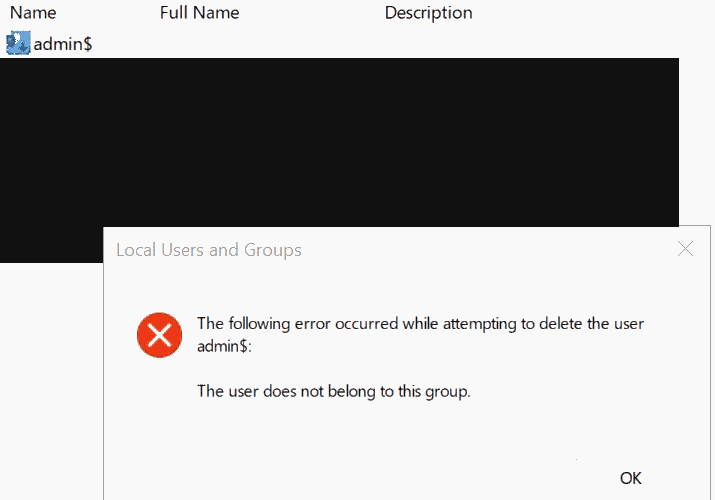
The command line gave the same thing. This post covers what the error means, the fixes that did not work for me, and the one that did. It took a few tries, so I am writing down the whole path.
What the error means
The message is NET HELPMSG 2237. It says the user is not in the group Windows is trying to remove them from. When you delete a local account, Windows first removes it from every local group it belongs to. If one group has a leftover or inconsistent membership entry for that account, that step fails and the delete stops.
I can’t prove exactly which entry was broken on my server, because no tool showed it. This is the most likely explanation, and it fits everything I saw: the account listed no groups, but it still would not delete.
What I checked first
I started with the account details:
C:\> net user "admin$"
Account active               No
Local Group Memberships
Global Group memberships     *None
The account was disabled and showed no group memberships, which is why the error made no sense. Note the quotes around the name. The $ at the end can cause trouble in PowerShell, so use single quotes there: 'admin$'.
Fixes that did not work
I tried each of these in an elevated shell. All of them failed with the same error.
# 1. net user
net user "admin$" /delete

# 2. PowerShell cmdlet, after renaming the account
Rename-LocalUser -Name 'admin$' -NewName 'tmpdel'
Remove-LocalUser -Name 'tmpdel'

# 3. ADSI
([ADSI]"WinNT://$env:COMPUTERNAME").Delete('User','tmpdel')
I renamed the account first to rule out the $ in the name. The rename worked, but the delete still failed, so the name was not the problem. All three methods go through the same account-deletion code, which explains why they all hit the same wall.
I also scanned every local group for the account, by name and by its SID:
foreach ($g in (Get-LocalGroup).Name) {
  $o = net localgroup "$g" 2>$null
  if ($o -match 'tmpdel|admin\$|-1008') { "FOUND in: $g" }
}
It found nothing. So the broken entry was not visible through the normal group listings.
The fix that worked: remove it from the SAM registry
Local accounts live in the SAM database, in the registry under HKLM\SAM\SAM. Normal admin rights cannot open that key, but the SYSTEM account can. I used Sysinternals PsExec to open Registry Editor as SYSTEM.
Back up first. A wrong edit in SAM can lock you out of the server. Take a VM snapshot, and save the hive too:
mkdir C:\ir
reg save HKLM\SAM C:\ir\SAM.hiv
Then open Registry Editor as SYSTEM. PsExec is not installed by default. Download it from Microsoft’s Sysinternals page, copy it to the server, and run:
PsExec64.exe -accepteula -s -i regeditIf you see “is not recognized”, PsExec64 is not in your path, or you used the wrong folder. I hit that mistake myself, so give the full path to the file.
In Registry Editor, go to:
HKEY_LOCAL_MACHINE\SAM\SAM\Domains\Account\Users\NamesEach local user has a key here. Click the one for your account and look at the (Default) value. Its type column shows the account’s RID in hex. Mine said 0x3f0, which is 1008 in decimal.
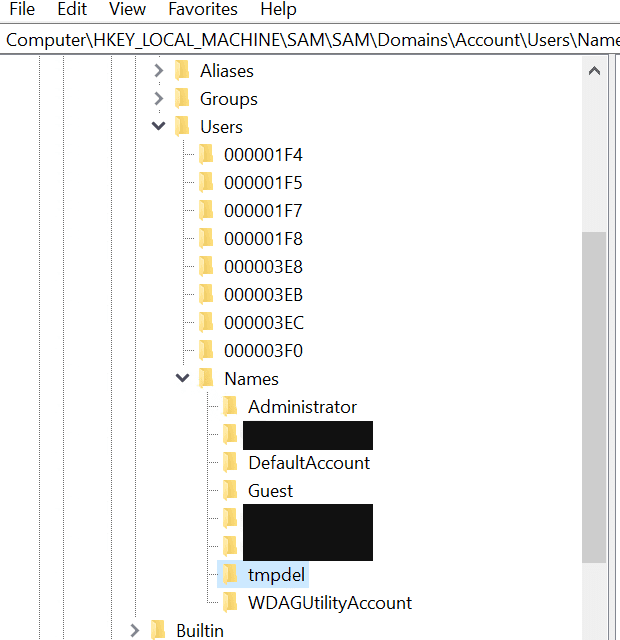
Now delete two keys:
- The account’s key under
...\Account\Users\Names - The key with the same RID under
...\Account\Users. It is named with the RID in 8 hex digits, so0x3f0becomes000003F0.
Close Registry Editor and reboot. After the restart the account was gone from both Local Users and Groups and net user.
If you want to be thorough, also look under HKLM\SAM\SAM\Domains\Builtin\Aliases. Each alias has a Members key, and a leftover entry for your account’s SID could be what caused the original failure. I did not need to touch it, but it is the first place I would look if the account comes back.
Before you delete it: check where the account came from
In my case this was not just a stuck cleanup. The account was one I did not recognise, with no description, and its name ended in $. A trailing $ is a trick that makes a user account look like a machine account. If you find an account like that on a server, find out who made it before you remove it. Save the Security log first:
wevtutil epl Security C:\ir\Security.evtxThen look for these events for the account: 4720 (account created), 4724 (password reset), and 4624 (logon, with the source IP). Also check net user "name" for the last logon time, and rotate the passwords on your real admin accounts afterwards.
Quick summary
- The error means a local group holds a membership entry Windows cannot remove for that account.
net user /delete,Remove-LocalUserand ADSI all use the same path, so they all fail together.- Renaming the account does not fix it, and scanning groups with
net localgroupmay show nothing. - Removing the account from the SAM registry (
Nameskey and theUsersRID key) worked. Take a backup first. - If you did not create the account, preserve the logs before you delete it.