wp-config.php.bak Publicly Accessible? How to Check and Fix a Backup in the Web Root
While hardening my own WordPress server, I edited wp-config.php. As a safety step, a backup copy of the file was saved first, in the same folder, with a date in its name. That folder is the web root. For as long as that copy sat there, anyone who guessed its file name could have downloaded a copy of my configuration, including the database password and the secret keys. This post shows how I noticed, how I fixed it, what the logs showed, and how to check your own site.
How I noticed
I checked whether the backup was reachable from the internet. The important detail is how I checked: I looked only at the HTTP status code and never printed the body, because the body of that file is exactly the kind of text that should never appear in a terminal log, a chat or a screenshot.
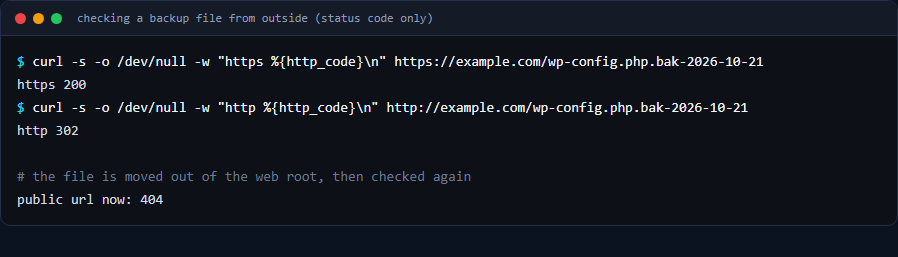
curl -s -o /dev/null -w "https %{http_code}\n" https://example.com/wp-config.php.bak-2026-10-21
https 200
curl -s -o /dev/null -w "http %{http_code}\n" http://example.com/wp-config.php.bak-2026-10-21
http 302
A 200 over HTTPS means the web server returned something for that address. For a backup file that is a strong sign it handed the file out, so treat it as public. (The 302 over plain HTTP is a redirect; I did not follow it, and on a typical setup it points to the HTTPS address.)
Why it was readable
On a typical Apache setup the web server decides what to do with a file from its name. Files that end in .php are run as PHP code, so a request for wp-config.php returns nothing useful. A file called wp-config.php.bak-2026-10-21 does not end in .php, so the server treats it as an ordinary file and sends its contents as they are. The same applies to .old, .orig, .save, .txt, a trailing ~, and archives such as .zip or .tar.gz left in the web root.
The fix
I moved the backup out of the web root, to a folder that the web server does not serve. Then I checked the public address again, again looking only at the status code:
public url now: 404The public address now returns 404: the web server no longer serves that file.
Checking whether anyone else fetched it
I counted the requests for that file name in the web server’s access log, again without printing any content. There were two, and both came from my own computer’s address. Nothing from any other address showed up. That is useful evidence, but it only covers the log lines I could see. A log can be rotated, and requests can be answered from a cache in front of the site, so if a configuration backup may have been public for longer than your logs reach, treat the secrets as exposed.
One more file that looked worse and was fine
While listing backup-looking files, I found an old copy of .htaccess from earlier work. Its name starts with .ht, and requesting it returned 403 Forbidden. Apache’s default configuration denies access to files whose names begin with .ht, so a copy named .htaccess.bak-... is protected by that rule. That protection depends on the file name starting with .ht, not on the folder, so do not rely on it for anything else.
If a secret may have been exposed: what to rotate
- Database password. Change it in the database and in
wp-config.phptogether, or the site will lose its connection. - The authentication keys and salts. Replacing them logs every user out and invalidates existing sessions, which is what you want if someone could have read them.
- Any API keys or SMTP passwords that live in the same file.
In my case the logs I checked showed no outside access, so I saw no sign of exposure. That does not prove nobody fetched the file, so if there is any doubt, rotate.
Check your own site
Replace the name with a backup you may have created, and look only at the status code:
curl -s -o /dev/null -w '%{http_code}\n' https://yourdomain.com/wp-config.php.bak
curl -s -o /dev/null -w '%{http_code}\n' https://yourdomain.com/wp-config.php.old
curl -s -o /dev/null -w '%{http_code}\n' https://yourdomain.com/wp-config.php~
You want 403 or 404. A 200 means the file is public. Also look through the web root for forgotten .sql, .zip, .tar.gz and .bak files.
As a safety net, you can ask Apache to refuse backup-style extensions. The rule below is a common pattern for Apache 2.4. It matches names that end in one of these extensions, so it would not have caught the dated name in this post (.bak-2026-10-21) or a trailing ~. I have not tested it on this server, so test it on your own and keep a copy of your .htaccess first:
<FilesMatch "\.(bak|old|orig|save|swp|sql|zip|tar|gz)$">
  Require all denied
</FilesMatch>
That is a net, not a fix. The fix is to never put backups where the web server can serve them.
Checklist
- Write backups outside the web root, in a folder the web server does not serve.
- Name does not protect a file: a file in the web root is public unless the server blocks it.
- Check reachability with the status code only, never by printing the body.
- Count requests in the access log to see whether anyone else fetched the file.
- If secrets may have been exposed, rotate the database password and the keys and salts.
- Remember that a container rebuild can lose files stored inside the container, so keep real backups on a persistent volume or off the server.