API Security Basics for Sysadmins (Ops View)
Here is a scenario that plays out often enough to plan for. A partner integration “suddenly” stops working. The app team blames the firewall, and the firewall looks fine. What actually happened: an old hostname still points at a secondary nginx vhost that serves the same API over plain HTTP, because someone “temporarily” commented out the HTTPS redirect during a certificate panic months earlier. An up-to-date inventory of hostnames and endpoints would have found it in ten minutes. Without one, it takes a war room.
If you run the servers that host APIs, you already own part of API security — even when developers write every handler. Attackers rarely start inside application code. They start with whatever you left reachable: an admin path on the public VIP, a .env with mode 644, an expired cert that trained people to skip verification, or a health endpoint that dumps config.
This guide is the ops half. No exploit recipes. Goal: inventory what you expose, prove TLS and auth edges are sane, and know what “looks healthy” after a change.
The problem in plain words
Application security reviews ask “can this user read that row?” Ops security asks different questions that still get you breached:
- What listeners exist on this host, and which of them are intentional?
- Who can reach them from the internet, the VPC, or a jump host?
- Where do tokens and DB passwords live on disk, and who can read them?
- If something goes wrong at 11pm, do logs tell you which route and status — without printing Authorization headers?
If you cannot answer those, “we use JWT” is decoration.
Common wrong assumption: “The cloud load balancer has HTTPS, so the app can listen on HTTP on all interfaces.” That is fine only if nothing else can reach the app port. Mis-peered security groups make “internal HTTP” public overnight.
How to check what you actually expose
Start on one API host (or the edge VM that terminates TLS). Paste output into the ticket before you change anything:
sudo ss -ltnp
sudo ss -lxnp | head -50
curl -sI https://api.example.com/health
curl -sI http://api.example.com/health
How to read it: ss -ltnp shows TCP listeners and the owning process. Anything bound to 0.0.0.0 or :: is reachable from every interface on that machine — including the public one if the security group allows it. A Node process on 127.0.0.1:3000 behind nginx is normal. The same process on 0.0.0.0:3000 with port 3000 open in the cloud firewall is how “internal” APIs leak.
Unix sockets (ss -lxnp) matter for PHP-FPM and some local proxies. If nginx points at a socket that does not exist, you get 502 — different problem, but inventory still catches “we thought FPM was up.”
Success look for TLS: curl -sI https://… returns the app’s status (often 200 or 401), not a cert error. curl -sI http://… should redirect to HTTPS (301/302) or refuse — not serve the real API in cleartext.
If HTTPS fails with certificate problems, stop and fix the cert before you debate rate limits. An expired cert trains users and scripts to disable verification. See also SSL certificate expired fix.
echo | openssl s_client -connect api.example.com:443 -servername api.example.com 2>/dev/null | openssl x509 -noout -dates -subject
You want notAfter in the future, and a subject/SAN that matches the name clients use.
Inventory first — why this is not optional
You cannot protect mystery endpoints. Maintain a short list — a spreadsheet is fine — with columns: name, public/partner/internal/admin, hostname, port or path, auth type, owner.
Why: after rushed launches, “temporary” routes stay live. Partner callbacks get a second hostname. Someone adds /admin/api on the same vhost as /v1. Inventory turns arguments into a checklist.
# nginx example — list upstreams and locations
sudo grep -REhn 'proxy_pass|fastcgi_pass|listen |server_name|location ' /etc/nginx/ 2>/dev/null | head -80
If you use an API gateway or Cloudflare, export the route list the same day. Shadow routes appear when DNS still points somewhere but the wiki says “deprecated.”
If inventory feels endless: start with anything on 443/80 from the public security group. Admin APIs come first among the rest — highest blast radius. Internal-only services second.
TLS and listeners — step-by-step
-
Terminate TLS where you intend. Prefer one edge (nginx, Caddy, cloud LB) and keep app processes on localhost or a private network. Why: one place to renew certs, one place to enforce HTTPS redirects, fewer accidental open ports.
-
Bind apps to localhost when the edge is on the same VM:
# confirm after deploy
sudo ss -ltnp | grep 3000
# expect 127.0.0.1:3000 or a private IP you deliberately chose
If you see
*:3000or0.0.0.0:3000, change the app listen address or firewall it immediately. -
Cloud security groups / NSGs: port 443 from the world (if public API). SSH only from bastion or your IP. App ports (3000, 8080, 5432) not from
0.0.0.0/0. A perfect app still loses if Postgres is on the internet. -
Internal APIs that cross networks still deserve TLS. Plain HTTP inside a VPC is “fine until a mis-peered subnet or a compromised jump host reads tokens off the wire.”
Opinion: I would rather have one boring nginx edge with a renew cron I understand than three “modern” gateways nobody owns. Complexity without an owner is not security.
Authn vs authz — what ops actually controls
Authentication answers who is calling. Authorization answers what they may do. Developers own most authz bugs. Ops still breaks production by leaving test API keys in env files, shipping images with production secrets baked in, logging full headers at info level, or exposing admin routes without SSO or a network split.
Secrets on hosts — concrete baseline:
ls -la /etc/myapp/ /opt/myapp/env/ 2>/dev/null
# expect: -rw-r----- root myapp  …  app.env
# not:    -rw-r--r-- root root
Mode 640, owner root, group the app user. Rotate when people leave. Do not paste live tokens into Slack “for debugging.” Permissions culture: users and groups.
If the app will not start after chmod: check the service user and fix group membership — do not chmod 644 to “make it work.”
Rate limits, logging, health — the boring middle
Edge rate limits will not stop a determined attacker with many IPs. They will reduce credential stuffing noise and buggy client retry stampedes. On nginx, a simple zone is better than nothing — but know success: under a controlled test from one IP, the Nth request gets 429. If everything returns 200 under flood, the limit is not attached to that location. Pair with network controls (fail2ban vs security groups) without pretending host jails replace API design.
Log request id, route, status, latency. Do not log Authorization, cookies, or PII bodies at info level.
sudo grep -R "Authorization\|Bearer " /var/log/nginx/ /var/log/myapp/ 2>/dev/null | head
Success: no hits (or only in a deliberate debug file you delete after). If you see full bearer tokens, fix the logger before the next ticket.
Liveness (“process up”) and readiness (“dependencies OK”) are different. A /health that returns DB strings, debug flags, or bypasses auth is a gift. Check:
curl -sS https://api.example.com/health | head -c 500; echo
curl -sS -o /dev/null -w "%{http_code}\n" https://api.example.com/health
You want a boring JSON blob (ok, maybe build id). If the body dumps env, treat it as a bug. Deeper ops checks: REST API healthchecks for ops.
Verify after changes
sudo ss -ltnp
curl -sI https://api.example.com/health
curl -sI http://api.example.com/health
echo | openssl s_client -connect api.example.com:443 -servername api.example.com 2>/dev/null | openssl x509 -noout -dates
# hit one real authenticated route you own — expect 200 or intentional 401/403, not 502
Success: only intended listeners; HTTPS works; HTTP redirects or dies; cert dates valid; app route behaves as designed. If SSH is still password-open to the world, fix that before polishing JWT settings — SSH hardening checklist.
If still stuck: compare today’s ss and nginx configs to last week’s backup or git. Most “mystery API” incidents are an extra listen, an old DNS record, or a container publishing 0.0.0.0 that nobody noticed in docker compose ps.
FAQ — real doubts
Is an API gateway mandatory?
No. Small shops often run nginx or Caddy with disciplined listeners and good TLS. Gateways help when you need central auth plugins, many teams, and shared rate-limit policy. Do not buy a gateway to avoid inventory.
What if curl works but mobile clients fail?
Often SNI, intermediate cert chain, or pinning. Check the chain with openssl s_client and a phone on cellular (not only office Wi‑Fi). Incomplete chains are a common “works on my laptop” lie.
Do internal APIs need TLS?
If they never leave a single host (localhost only), TCP cleartext is a smaller risk. If they cross VMs or accounts, yes — treat them like public ones for transport.
Where does mTLS fit?
Service-to-service identity. Ops owns distributing and rotating client certs. If you cannot rotate without an outage, you do not have mTLS — you have a future incident.
How do I map this to OWASP without turning into a pentester?
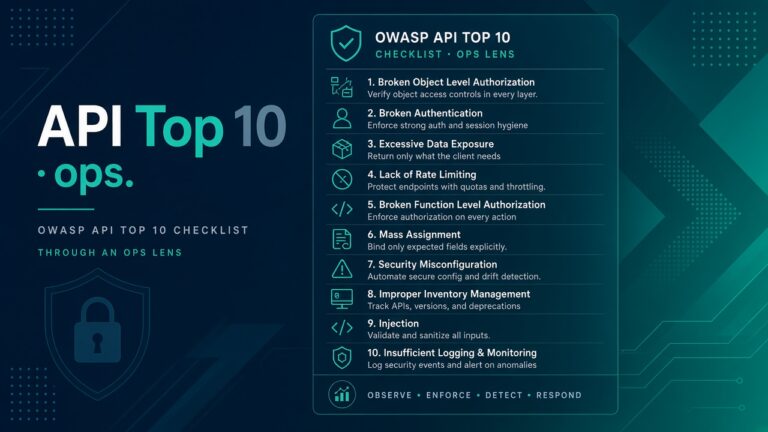
Use the themes — exposure, authn/z, config, inventory — as a shared language with developers. Stay defensive and in scope you own. Next reading: OWASP API Top 10 ops view.