Coolify Dashboard Not Loading but Sites Are Up: Unhealthy Container After an Update
The Coolify dashboard stopped loading, but every site it hosts kept working. That mismatch is the clue: the proxy that serves your sites and the Coolify application that serves the dashboard are separate containers, and only one of them was broken. This is how I narrowed it down on my own VPS, using read-only commands, before changing anything.
Symptom
- The Coolify dashboard, both on its domain and on
http://SERVER-IP:8000, would not load. - The websites running on the same server were up as normal.
Step 1: rule out the server itself
Before blaming Coolify, I checked that the machine was healthy. Load, memory and disk took a minute:
uptime
free -m
df -h /
Load average was 0.3, about 3 GB of 16 GB of RAM was in use and 165 GB of disk was free, so this was not a resource problem.
Step 2: check the firewall and the ports
ufw status
ss -ltnp | grep -E ':(80|443|8000|6001|6002) '
fail2ban-client status sshd
UFW allowed ports 80, 443, 8000, 6001 and 6002, and Docker was listening on all of them. Fail2ban had four banned addresses, none of them mine. So the dashboard was not blocked at the network level.
Step 3: look at the Coolify containers
docker ps -a --format "{{.Names}}\t{{.Status}}" | grep -i -E "coolify|traefik|proxy"This showed the difference straight away:
coolify-db,coolify-redis,coolify-sentinelandcoolify-proxywere healthy.coolify, the application container that serves the dashboard, was unhealthy.
That explains why the sites worked: they are served by the proxy (Traefik), which was fine. Only the dashboard container was down.
Step 4: read the health check and the log
docker inspect coolify --format "{{range .State.Health.Log}}{{.ExitCode}} | {{.Output}}{{println}}{{end}}"
docker inspect coolify --format "{{.State.Health.FailingStreak}} failures since {{.State.StartedAt}}"
docker logs --tail 25 coolify
The health check was failing with curl: (7) Failed to connect to 127.0.0.1:8080, which means nothing was listening on the port the web server should use. The failure count was above 200,000 and had not stopped since the container was started on 9 October. The end of the log showed why:
/run/s6/basedir/scripts/rc.init: line 65: can't create /etc/s6-overlay/s6-rc.d/user/type: Permission deniedThe container’s init system (s6-overlay) was failing with a permission error before the web server started, so the dashboard never came up.
Step 5: find what changed
I checked which image the container was running and when it had been created:
docker inspect coolify --format "image={{.Config.Image}} user=[{{.Config.User}}] created={{.Created}}"
docker images | grep coolify
The container was running coollabsio/coolify:4.4.5, created on 9 October at 18:30, which is the time of Coolify’s daily automatic update. The server still had the previous image, 4.4.3. So Coolify had updated itself overnight from 4.4.3 to 4.4.5, and the new container had never started properly.
One more check told me how risky a rollback would be. Coolify runs its database migrations when it starts. The newest migration in the database was dated 7 October, before the update, so the database had not been changed by 4.4.5:
docker exec coolify-db psql -U coolify -d coolify -t -c "select migration from migrations order by id desc limit 3;"What I tried first: a restart
docker restart coolifyThe restart produced the same permission error and the same unhealthy state, so it was not a one-off glitch.
The fix: roll back to the previous version
Coolify reads the image tag from LATEST_IMAGE in /data/coolify/source/.env. I backed that file up, set the tag back to the last version that worked, and recreated only the Coolify container, leaving the database and Redis alone:
cp -p /data/coolify/source/.env /root/backups/coolify-env.bak
cd /data/coolify/source
sed -i 's/^LATEST_IMAGE=4.4.5$/LATEST_IMAGE=4.4.3/' .env

# use the project name the container was created with (see the next section)
P=$(docker inspect coolify --format '{{index .Config.Labels "com.docker.compose.project"}}')
docker compose --project-name "$P" --env-file .env \
  -f docker-compose.yml -f docker-compose.prod.yml \
  up -d --no-deps --pull never --force-recreate coolify
This is a rollback, not a lasting pin: while Coolify’s automatic update stays on, it can move you forward again (see the section below). If you have added your own override file such as docker-compose.custom.yml, include it with another -f, or the recreate will drop your override.
Two flags matter here. --pull never makes Docker use the 4.4.3 image already on the server instead of downloading anything, and --no-deps stops it from touching the database and Redis containers.
A mistake worth avoiding: the Compose project name
My first attempt used --project-name coolify, because the stack is called Coolify. It failed with “The container name /coolify is already in use” and warned that the coolify-db and coolify-redis volumes “were created for project source”. The stack had been created from the folder /data/coolify/source, so its project name was source. Reading the name from the container’s com.docker.compose.project label, as in the command above, removes the guesswork. Nothing was changed by the failed attempt, but a wrong project name can make Compose try to create a second set of containers and volumes, so check the label first.
Result
About a minute after the recreate, the container was running coollabsio/coolify:4.4.3 and the dashboard answered with HTTP 200. The health check passed for the first time since 9 October (failing streak back to 0) once the start-up period ended. The websites stayed up throughout. The log still showed two harmless lines: a timeout from Coolify’s IPv6 address check, because the server has no IPv6 route out, and a small undefined-variable warning in Coolify’s own code.
What happened next
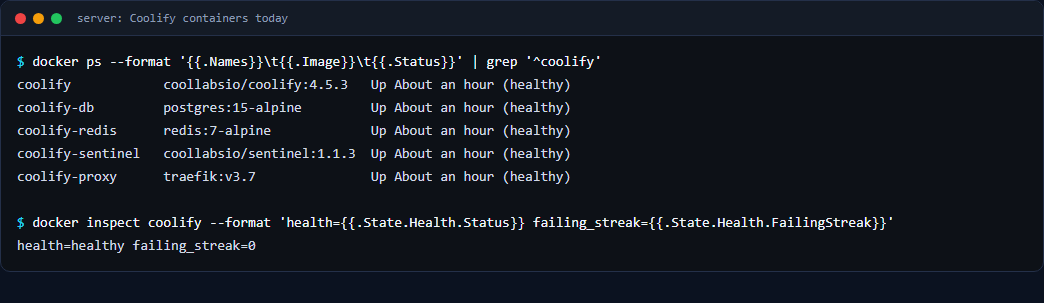
Later releases (4.4.7 and then 4.5.3) started normally and stayed healthy, so the 4.4.5 problem was specific to that release on this server. The more important finding came when I looked at Coolify’s update settings afterwards: automatic updates were still switched on, scheduled to run once a day. That means the same kind of surprise could happen again with any future release. Check this setting on your own instance, and decide whether you want unattended updates on a server that hosts live sites.
While I was on the server, I also noticed that the dashboard’s port 8000 was open to the whole internet in addition to its normal domain. A firewall rule did not close it, because Docker bypasses UFW. How to close it properly is in Docker ignores UFW: why a closed port still answers.
Prevent it happening again
- Turn off Coolify’s auto-update in its settings once you can log in, and update on a day when you can watch the result.
- Keep the previous image until the new one has proved itself. Here, the 4.4.3 image still being on the server is what makes a rollback quick.
- Know which container serves what. Sites run through the proxy; the dashboard runs in the
coolifycontainer. A dead dashboard does not mean dead sites, and it does not mean a firewall problem. - Back up
/data/coolify/source/.envbefore any change. It holds the keys Coolify needs to decrypt its own data, and it must never be pasted into a ticket or a chat.
Checklist
- Server healthy?
uptime,free -m,df -h - Ports and firewall?
ufw status,ss -ltnp - Which Coolify container is unhealthy?
docker ps -a - What does the health check say?
docker inspect coolify - What does the log say?
docker logs coolify - What changed, and when? Image tag and creation time
- Can the database stay as it is? Check the last migration date
- Roll back one container, with a backup of the
.envfile
If you run several sites on one VPS, see also Cloudflare 522 on a Coolify VPS and automatic WordPress backups to Google Drive.