Linux Disk Full: df, du, lsof, and Inodes
Monitoring says a filesystem is 100%. The app throws write errors. Someone asks whether to reboot. Do not reboot yet. Rebooting sometimes clears temp files and “fixes” the symptom — and sometimes destroys the evidence of what filled the disk. Here is the path I take on Linux when space or inodes run out.
If you are still getting comfortable on the command line, pair this with the Linux roadmap for beginners. Cleanup under fatigue is how people meet the cautionary commands that can wipe a server story — read before you craft a clever rm.
First minute: what kind of “full” is it?
Run these before you delete anything:


df -hT
df -i
df -hT shows human sizes and filesystem type. Look for Use% near 100% on /, /var, /home, or a dedicated data mount.
df -i shows inode usage. Inodes are the filesystem’s slots for file metadata. You can have free gigabytes and still be “full” if millions of tiny files ate every inode.
Why both: capacity-full and inode-full feel the same to many apps (“No space left on device”) but the fix path diverges. If capacity is fine but inodes are maxed, skip to the inode section. If capacity is maxed, continue with du and lsof.
Paste both outputs into the incident ticket before you change anything. Future-you needs the proof.
Common wrong assumption: “df on / is enough.” Separate /var or Docker data mounts fill while root looks healthy. Always read every line.
Find fat directories with du (without melting the box)
Blind du -sh /* works on small VMs. On busy servers be kinder:
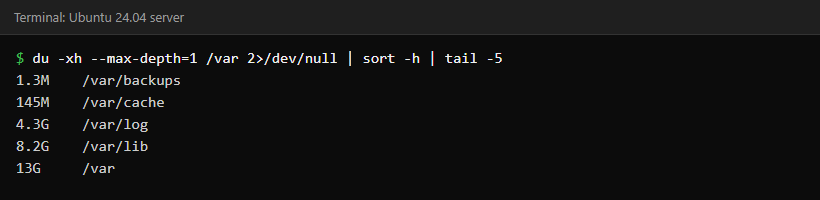
du -xh / --max-depth=1 2>/dev/null | sort -h
# or per mount:
du -xh /var --max-depth=2 2>/dev/null | sort -h | tail -n 30
-x stays on one filesystem (does not recurse into other mounts). sort -h sorts human sizes. Usual suspects: /var/log, /var/lib/docker, /var/lib/mysql, /home, package caches, “temporary” dumps in /tmp or home directories.
When you find a fat path, go one level deeper. Do not rm -rf the first big directory you see — that is how people delete the wrong volume mount. Refresh special characters before wildcard deletes.
The classic trap: deleted files still held open
You truncated or deleted a 40GB log. du looks better. df still says 100%. The process still has the file handle. Space frees only when that process closes the file or exits.
sudo lsof +L1
sudo lsof 2>/dev/null | grep -i deleted | head
Common culprits: long-running Java apps, nginx/apache workers, dockerd, databases writing huge logs that logrotate deleted without a reopen signal.
Safer fix than kill -9:
- Identify the PID and deleted path from
lsof. - If it is a log: ask the app to reopen logs (
kill -USR1for some daemons, or proper rotate config), or restart the service in a change window — not the whole host. - For Docker: check container log growth and log drivers; do not casually prune volumes in panic.
Opinion: if you do not already know the /proc/PID/fd truncate emergency trick cold, restart the offending service instead. Copy-paste footguns under pressure create worse incidents.
Success look: after service restart or log reopen, df -h shows freed space matching roughly what lsof reported for the deleted file.
Inode exhaustion: millions of tiny files
Symptoms: df -h fine, df -i at 100%, create fails with no space.
sudo find / -xdev -printf '%h\n' 2>/dev/null | sort | uniq -c | sort -nr | head -n 20
Typical sources: PHP sessions/cache dirs, mail queues, CI artifacts, broken apps writing one unique file per request, container overlay leftovers.
Fix the generator, then clean. Deleting millions of files hammers disks — use find ... -delete in batches, or remove whole trees you have verified disposable.
If still stuck: inode counts are often fixed at mkfs time. On an existing filesystem you usually clean files or migrate to a new volume with more inodes. Plan capacity on file count, not only gigabytes.
When df says full but the space is not where you expect
Reserved blocks on ext4
ext4 reserves a share of its blocks for privileged processes, 5% by default when the filesystem is created (see the tune2fs(8) manual page). The Avail column in df leaves that reservation out for ordinary users, so a disk can look full to an application while root can still write. On a large data disk, 5% is a lot of space. Check the numbers, then lower the percentage on a non-root data disk. /dev/sdb1 is only an example, so confirm the right device with lsblk first:
sudo tune2fs -l /dev/sdb1 | grep -iE 'block count|reserved block'
sudo tune2fs -m 1 /dev/sdb1
Leave the default on the root filesystem. This applies to ext2, ext3 and ext4 only; XFS has no ext4-style reserved-percentage setting.
Files hidden under a mount point
If files were written to /data before a disk was mounted there, the mount covers them. df counts them on /, but du /data cannot see them. A bind mount shows the directory as it exists on the underlying filesystem. It is a live view of the real files, so only read from it and unmount it afterwards:
sudo mkdir -p /mnt/rootview
sudo mount --bind / /mnt/rootview
sudo du -xh --max-depth=1 /mnt/rootview/data
sudo umount /mnt/rootview
Logs, journald, and Docker — usual suspects
journald:
journalctl --disk-usage
sudo journalctl --vacuum-size=500M
# or
sudo journalctl --vacuum-time=7d
Also set SystemMaxUse= in journald config so this does not recur every Friday.
Classic /var/log: confirm logrotate runs; gzipped rotated logs still count; apps logging to a single unrotated file fill disks quietly.
Docker:
docker system df
# Only after you understand what you will lose:
# docker system prune
# docker volume prune   # dangerous if unnamed volumes hold data
Prefer explicit retention and log opts over panic prune:
{
  "log-driver": "json-file",
  "log-opts": {
    "max-size": "50m",
    "max-file": "3"
  }
}
Calm cleanup order (print this)
df -hT+df -i— classify the failure.dutop offenders on the full mount.lsoffor deleted-open files.- Vacuum journals / rotate logs safely.
- Clear package caches (
apt-get clean,dnf clean all) if appropriate. - Only then touch application data — with backups or snapshots in mind.
- Write the postmortem note: what filled, why monitoring was late, what retention to change.
Worked example: /var at 100% after a noisy weekend
Friday deploy. Monday / is fine but /var is full. df -hT shows the separate mount. du -xh /var --max-depth=2 points at /var/lib/docker and /var/log.
Inside logs: a 28GB application.log that logrotate thought it rotated — but the Java process still held the deleted inode. lsof +L1 shows the PID. Restart the app service in a change window (not the whole VM), vacuum journald to 500MB, set Docker log options as above, alert at 80% on /var, weekly ticket to review retention. That is the difference between a hero reboot and an engineered fix.
Package caches, dumps, and tiny /boot
sudo du -xh /home /root /opt /usr/local --max-depth=2 2>/dev/null | sort -h | tail -n 40
Hunt *.sql.gz “quick backups,” core dumps, snap revisions on Ubuntu, CI artifacts on the same disk as production (please do not). Old kernels can fill a tiny /boot and block upgrades — different mount, same incident class.
When you must grow the disk
- Snapshot / backup first if the data matters.
- Increase volume size in the cloud console.
- Grow partition if needed (
growpart). - Grow filesystem (
resize2fs,xfs_growfs). - Confirm with
df -h.
Growing without finding the leak means a larger bill and the same mystery next month.
Prevention that sticks: alert at 75% and 85%, not only at 98%; separate mounts for Docker/DB when justified; cap journald and container logs; name an owner for every noisy service. Fold disk checks into broader ops habits in the SysAdmin → DevOps roadmap. Compromised boxes filling /tmp with miners are still disk-full incidents — SSH hardening belongs in the reliability conversation.
Next action after the incident: set the 80% alert and one retention change the same day, while pain is fresh.
FAQ — real doubts
Why does df show full but du doesn’t add up?
Usually deleted-open files, or you compared across mounts/bind mounts. Use du -x and lsof for deleted files.
Is it safe to delete everything in /tmp?
Often yes for old files, never blindly while apps are mid-job. Prefer systemd-tmpfiles policies over manual massacre.
Can inode limits be raised?
Sometimes at mkfs time; on an existing filesystem you are usually stuck cleaning or migrating. Plan on file count, not only gigabytes.
Should I reboot to free space?
Only as a last resort when you know deleted-open files are held by services you are restarting anyway. Reboot is not root-cause analysis.
Cloud disk full on a tiny root volume?
Resize/grow if the platform allows — but still find the leak. Bigger disks fill just as cheerfully.
Sources
- df(1) manual page
- lsof(8) manual page, for
+L1and deleted-but-open files