Windows 11 and 10 Generic Keys for All Editions, Plus Microsoft KMS Client Keys
A Windows 11 generic key (also called a generic product key or default key) tells Windows Setup which Windows 11 or Windows 10 edition to install. It does not give you a licence. This page lists the generic keys for all common client editions, Microsoft’s KMS client setup keys for Windows and Windows Server, the commands to use and check them, and how to find your own product key now that wmic is gone.
Quick answer: The Windows 11/10 Pro default key is VK7JG-NPHTM-C97JM-9MPGT-3V66T and the Home key is YTMG3-N6DKC-DKB77-7M9GH-8HVX7. They select an edition but grant no licence; Windows may activate automatically with an existing matching digital licence, or after you add a valid licence. KMS client keys work only with an organisation’s volume activation.
Tested on: Windows 11 Pro, build 26300, November 2026. KMS keys checked against Microsoft Learn on 22 November 2026.
What is a Windows generic product key?
A Windows generic product key is a public key that tells Windows Setup which edition to install, such as Home or Pro. It is the same for everyone, so it cannot prove you own a licence and it does not give you the right to use Windows.
What happens after you use one depends on the PC. If the device already has a digital licence for that edition (for example, Windows was activated on it before), Windows can activate automatically once it is online. If not, Windows shows “Windows isn’t activated” until you add a valid licence. Test installs and virtual machines still need a proper licence or an authorised evaluation copy.
What is the difference between a default key and a KMS client key?
A default key only selects an edition. A KMS client setup key, which Microsoft calls a Generic Volume License Key (GVLK), makes Windows a volume-activation client that activates through an organisation’s Key Management Service (KMS) host or Active Directory-based activation.
| Key type | What it does | Who it is for | Official list |
|---|---|---|---|
| Default (generic) installation key | Selects an edition; grants no licence. Activation still needs a matching licence on the device. | Installing or reinstalling a specific edition | Not published on Microsoft Learn; widely documented (see sources) |
| KMS client setup key (GVLK) | Lets Windows activate through the organisation’s KMS host or Active Directory-based activation | Volume-licensed business, school and server machines | Microsoft Learn |
A GVLK cannot supply a retail licence. Microsoft does list converting a retail installation into a KMS client as a valid reason to install a GVLK, but only where the organisation has the volume-licensing rights and activation service to back it.
Which default keys select Windows 11 and Windows 10 editions?
These default installation keys are the same for Windows 11 and Windows 10. They select the edition only; none of them is a licence. Microsoft does not list them on a Learn page, so we checked every key against two independent public lists (November 2026) and include only keys both lists agree on. The list covers common editions, not every edition Microsoft makes.
| Edition | Default key (selects edition, no licence) |
|---|---|
| Windows 11/10 Home | YTMG3-N6DKC-DKB77-7M9GH-8HVX7 |
| Windows 11/10 Home N | 4CPRK-NM3K3-X6XXQ-RXX86-WXCHW |
| Windows 11/10 Home Single Language | BT79Q-G7N6G-PGBYW-4YWX6-6F4BT |
| Windows 11/10 Home Country Specific | N2434-X9D7W-8PF6X-8DV9T-8TYMD |
| Windows 11/10 Pro | VK7JG-NPHTM-C97JM-9MPGT-3V66T |
| Windows 11/10 Pro N | 2B87N-8KFHP-DKV6R-Y2C8J-PKCKT |
| Windows 11/10 Pro for Workstations | DXG7C-N36C4-C4HTG-X4T3X-2YV77 |
| Windows 11/10 Pro for Workstations N | WYPNQ-8C467-V2W6J-TX4WX-WT2RQ |
| Windows 11/10 Pro Education | 8PTT6-RNW4C-6V7J2-C2D3X-MHBPB |
| Windows 11/10 Pro Education N | GJTYN-HDMQY-FRR76-HVGC7-QPF8P |
| Windows 11/10 Education | YNMGQ-8RYV3-4PGQ3-C8XTP-7CFBY |
| Windows 11/10 Education N | 84NGF-MHBT6-FXBX8-QWJK7-DRR8H |
| Windows 11/10 Enterprise | XGVPP-NMH47-7TTHJ-W3FW7-8HV2C |
| Windows 11/10 Enterprise N | WGGHN-J84D6-QYCPR-T7PJ7-X766F |
| Windows 11/10 Enterprise G N | FW7NV-4T673-HF4VX-9X4MM-B4H4T |
Enterprise and Education are licensed through organisations, not sold as ordinary retail boxes. N editions leave out certain media technologies and preinstalled media apps; the Media Feature Pack restores them. Home Single Language is an OEM edition locked to one display language, and Home Country Specific is the Home edition made for China; both come preinstalled on new PCs. Not sure which edition you need? See Windows 11 Home vs Pro.
What are Microsoft’s KMS client setup keys for Windows 11 and Windows 10?
These KMS client setup keys come from Microsoft’s own list and are the same for Windows 11 and Windows 10. They work only inside an organisation that has volume licences and a working KMS host or Active Directory-based activation.
| Edition | KMS client setup key (GVLK) |
|---|---|
| Windows 11/10 Pro | W269N-WFGWX-YVC9B-4J6C9-T83GX |
| Windows 11/10 Pro N | MH37W-N47XK-V7XM9-C7227-GCQG9 |
| Windows 11/10 Pro for Workstations | NRG8B-VKK3Q-CXVCJ-9G2XF-6Q84J |
| Windows 11/10 Pro for Workstations N | 9FNHH-K3HBT-3W4TD-6383H-6XYWF |
| Windows 11/10 Pro Education | 6TP4R-GNPTD-KYYHQ-7B7DP-J447Y |
| Windows 11/10 Pro Education N | YVWGF-BXNMC-HTQYQ-CPQ99-66QFC |
| Windows 11/10 Education | NW6C2-QMPVW-D7KKK-3GKT6-VCFB2 |
| Windows 11/10 Education N | 2WH4N-8QGBV-H22JP-CT43Q-MDWWJ |
| Windows 11/10 Enterprise | NPPR9-FWDCX-D2C8J-H872K-2YT43 |
| Windows 11/10 Enterprise N | DPH2V-TTNVB-4X9Q3-TJR4H-KHJW4 |
| Windows 11/10 Enterprise G | YYVX9-NTFWV-6MDM3-9PT4T-4M68B |
| Windows 11/10 Enterprise G N | 44RPN-FTY23-9VTTB-MP9BX-T84FV |
Microsoft’s KMS key page lists no keys for Home editions; lists that show “KMS keys” for Windows Home did not come from that page.
Which KMS client keys apply to Windows LTSC, LTSB and IoT Enterprise?
Windows Enterprise LTSC (Long-Term Servicing Channel) editions share one KMS client key across several releases, according to Microsoft’s list. Like all GVLKs, they need an organisation’s volume activation to activate.
| Edition | KMS client setup key (GVLK) |
|---|---|
| Windows 11 Enterprise LTSC 2024, Windows 10 Enterprise LTSC 2021 and 2019 | M7XTQ-FN8P6-TTKYV-9D4CC-J462D |
| Windows 11 Enterprise N LTSC 2024, Windows 10 Enterprise N LTSC 2021 and 2019 | 92NFX-8DJQP-P6BBQ-THF9C-7CG2H |
| Windows IoT Enterprise LTSC 2024 and 2021 | KBN8V-HFGQ4-MGXVD-347P6-PDQGT |
| Windows 10 Enterprise LTSB 2016 | DCPHK-NFMTC-H88MJ-PFHPY-QJ4BJ |
| Windows 10 Enterprise N LTSB 2016 | QFFDN-GRT3P-VKWWX-X7T3R-8B639 |
| Windows 10 Enterprise LTSB 2015 | WNMTR-4C88C-JK8YV-HQ7T2-76DF9 |
| Windows 10 Enterprise N LTSB 2015 | 2F77B-TNFGY-69QQF-B8YKP-D69TJ |
For Windows IoT Enterprise LTSC image version 10.0.19044.2905 or later, Microsoft points to its separate “Windows IoT Enterprise LTSC in Volume License” page.
What are the KMS client keys for Windows Server 2025, 2022 and 2019?
Volume-licensed Windows Server media already contains the right KMS client key. You may need to add one by hand, for example when converting from a MAK or retail key, or when the server was previously a KMS host. Converting an evaluation edition to a full edition is a separate process with its own rules; see Microsoft’s upgrade and conversion options.
| Windows Server edition | KMS client setup key (GVLK) |
|---|---|
| Windows Server 2025 Standard | TVRH6-WHNXV-R9WG3-9XRFY-MY832 |
| Windows Server 2025 Datacenter | D764K-2NDRG-47T6Q-P8T8W-YP6DF |
| Windows Server 2025 Datacenter: Azure Edition | XGN3F-F394H-FD2MY-PP6FD-8MCRC |
| Windows Server 2022 Standard | VDYBN-27WPP-V4HQT-9VMD4-VMK7H |
| Windows Server 2022 Datacenter | WX4NM-KYWYW-QJJR4-XV3QB-6VM33 |
| Windows Server 2022 Datacenter: Azure Edition | NTBV8-9K7Q8-V27C6-M2BTV-KHMXV |
| Windows Server 2019 Standard | N69G4-B89J2-4G8F4-WWYCC-J464C |
| Windows Server 2019 Datacenter | WMDGN-G9PQG-XVVXX-R3X43-63DFG |
| Windows Server 2019 Essentials | WVDHN-86M7X-466P6-VHXV7-YY726 |
How do you use a default key?
You use a default key during Windows Setup or in the Activation settings. The command-line example below only replaces a key on an edition that already matches; Home to Pro should go through Settings or the Microsoft Store.
- During setup: when Windows Setup asks for a product key, type the default key for the edition you want. If the PC already has a digital licence, you can choose “I don’t have a product key” and pick the edition it is licensed for; Windows activates once online.
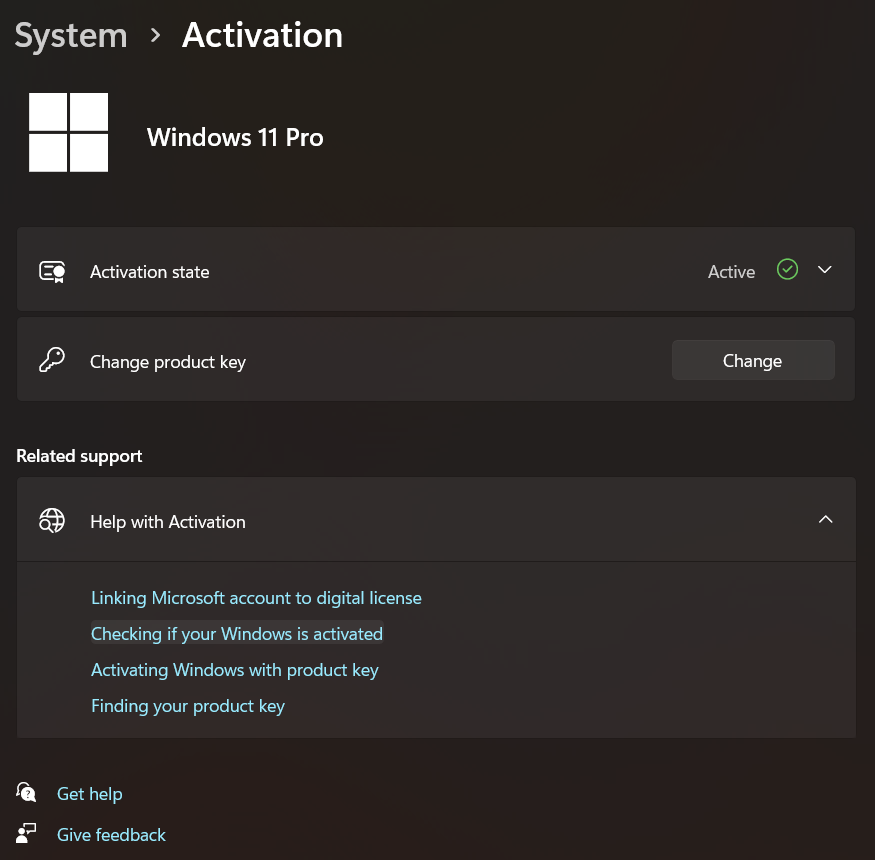
- To change edition (for example Home to Pro) on Windows 11: open Settings > System > Activation and select Change next to “Change product key” (on some builds it sits under “Upgrade your edition of Windows”), enter the key, follow the prompts and restart. On Windows 10 the page is Settings > Update & Security > Activation. To end up activated you need a licence for the new edition, either your own key or a purchase from the Microsoft Store.
- From an elevated command prompt (same edition):
slmgr /ipkinstalls a key andslmgr /dlishows the licence information. Some edition upgrades (for example Pro to Enterprise) do support command-line tools, but Microsoft’s edition upgrade table does not list the command line for Home to Pro.slmgr /ipk VK7JG-NPHTM-C97JM-9MPGT-3V66T slmgr /dli
On a volume-licensed work PC, IT installs the KMS client key and runs slmgr /ato to try activation. KMS clients normally find the KMS host automatically through DNS. slmgr /skms sets a fixed host and should only be used when IT tells you to; slmgr /ckms removes it again (slmgr options).
slmgr /ipk W269N-WFGWX-YVC9B-4J6C9-T83GX
slmgr /ato
A KMS host counts the unique eligible computers that contacted it in the last 30 days: Windows clients activate once the count reaches 25, Windows Server once it reaches 5, and the host must support the client’s Windows version. KMS activation lasts 180 days, renewing automatically while the PC can still reach the host. That is why a laptop that stays off the company network for months can drop back to “not activated”.
How do you check which key and licence your PC uses?
You can see the installed key’s channel and the activation state in PowerShell without admin rights. The description shows the channel of the key that is installed now (for example RETAIL, OEM or VOLUME_KMSCLIENT), and LicenseStatus 1 means Windows reports itself as licensed.
Get-CimInstance SoftwareLicensingProduct -Filter "PartialProductKey IS NOT NULL AND Name LIKE 'Windows%'" |
  Select-Object Name, Description, LicenseStatus, PartialProductKey | Format-List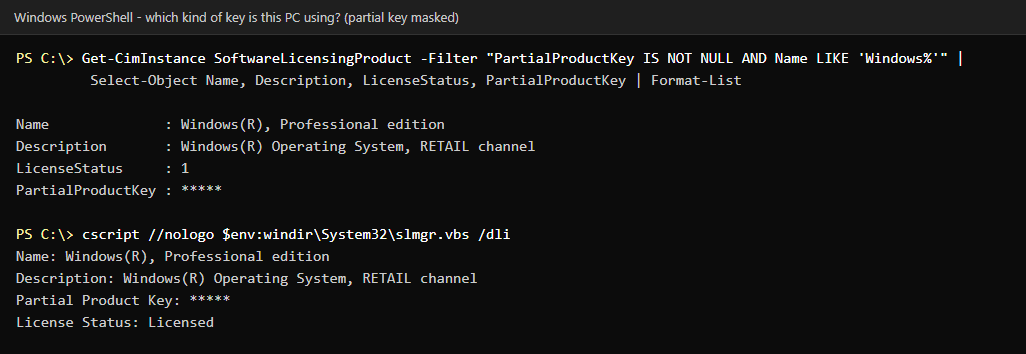
On our test laptop both commands report a Professional edition on the RETAIL channel, licensed. The channel describes the installed key, which may be a default key, so it does not prove what kind of licence was bought; the query can also return more than one record. To read your own product key, see the next section.
How do you find your Windows product key now that wmic is gone?
You find the Windows product key stored in your PC’s firmware with one PowerShell command, because the old wmic path softwarelicensingservice get OA3xOriginalProductKey command no longer exists on current Windows 11 builds. Run this in PowerShell, or from Command Prompt with the powershell -Command wrapper shown in the screenshot:
(Get-CimInstance SoftwareLicensingService).OA3xOriginalProductKey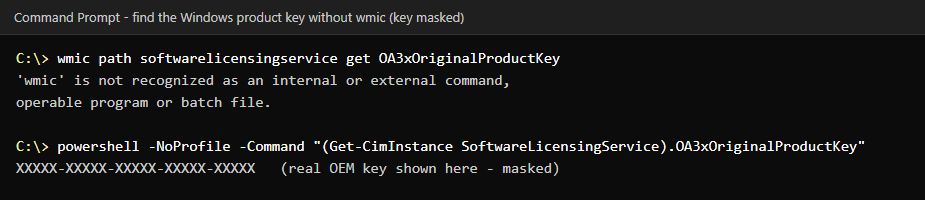
This works only if the PC maker embedded an OEM key in the firmware. A blank result does not mean Windows is unlicensed: many PCs activate with a digital licence and have no key to show. The firmware key may also be for the edition the PC shipped with (often Home) rather than the one installed now. Retail keys are on the card, box or purchase email. Treat any real key as private. More replacements for old WMIC commands are in our WMIC fix guide.
Why is the Windows 11 generic key not working?
A Windows 11 generic key “not working” usually means one of two things. Either Setup rejects it because that edition is not on your installation media, or the key is accepted but Windows stays not activated, because the generic key grants no licence. Check that you used the key for the edition you want and that your installation media contains it. To activate (see Microsoft’s activation help):
- If the PC had activated Windows before, make sure you installed the same edition, connect to the internet and run Troubleshoot on the Activation page (Windows 11: Settings > System > Activation; Windows 10: Settings > Update & Security > Activation). Linking the digital licence to a Microsoft account helps after hardware changes.
- Enter your own retail or OEM key for that edition with Change product key.
- Buy a licence for the edition you installed from the Microsoft Store or an authorised seller.
- At work, ask IT: the PC must reach the organisation’s KMS host or use its Active Directory-based activation or MAK.
Do not use unauthorised activation services or “activator” tools. They do not give you a Windows licence, and downloaded activators usually ask for administrator access, which exposes your PC to malware.
What else should you know about Windows generic keys?
Does a generic key give me the right to use Windows?
No. Generic keys are public and only select an edition. You still need a valid Windows licence, or an authorised evaluation copy, for every installation, including virtual machines.
What is the generic product key for Windows 10 Pro?
The Windows 10 Pro generic key is VK7JG-NPHTM-C97JM-9MPGT-3V66T, the same as Windows 11 Pro. It installs or selects Pro but does not activate it without a Pro licence. The Pro KMS client key, for volume-licensed organisations only, is W269N-WFGWX-YVC9B-4J6C9-T83GX.
Is the Windows 11 generic key different from the Windows 10 key?
No. The same default keys and the same Microsoft KMS client keys apply to the matching Windows 10 and Windows 11 editions.
Can I use a KMS client key on my personal PC?
Not legitimately, unless the PC is covered by an organisation’s volume licence and can reach that organisation’s activation service (for example a work laptop on the company VPN). A KMS key on its own activates nothing.
Where do I find my real Windows product key?
Many new PCs use a digital licence or an OEM key in the firmware (see the PowerShell command above). Retail keys come on the card, box or purchase email. A digital licence belongs to the device’s hardware and can be linked to your Microsoft account to help with reactivation.
Can Windows Home Single Language be upgraded to Pro?
Yes, with a Pro licence (a Pro key or a Microsoft Store purchase), from the Activation page: Settings > System > Activation on Windows 11, or Settings > Update & Security > Activation on Windows 10. A Single Language licence does not cover Pro, so a default Pro key alone will not activate it.
Sources
- Microsoft Learn: KMS client activation and product keys (updated 2 April 2026; checked 22 November 2026)
- Microsoft Learn: Active Directory-based activation
- Microsoft Learn: Activate using Key Management Service
- Microsoft Learn: KMS activation planning (25-client / 5-server threshold, 180-day validity)
- Microsoft Learn: KMS and DNS troubleshooting
- Default keys cross-checked against Winaero and MajorGeeks (checked 22 November 2026)