Windows 11 Home vs Pro: What You Actually Get and When Pro Is Worth It
Windows 11 Home vs Pro explained: BitLocker, Remote Desktop host, Hyper-V, Sandbox, Group Policy, domain join and RAM limits, plus how to check your edition and upgrade.

Windows 11 Home vs Pro explained: BitLocker, Remote Desktop host, Hyper-V, Sandbox, Group Policy, domain join and RAM limits, plus how to check your edition and upgrade.

A defensive Linux privilege-escalation audit with real output: sudo rules, SUID and SGID files, capabilities, root-equivalent groups, writable cron paths and patch level.

A GDB cheat sheet for sysadmins with real output: reading a crash backtrace, breakpoints, watchpoints, attaching to a hung process and saving or opening core files.
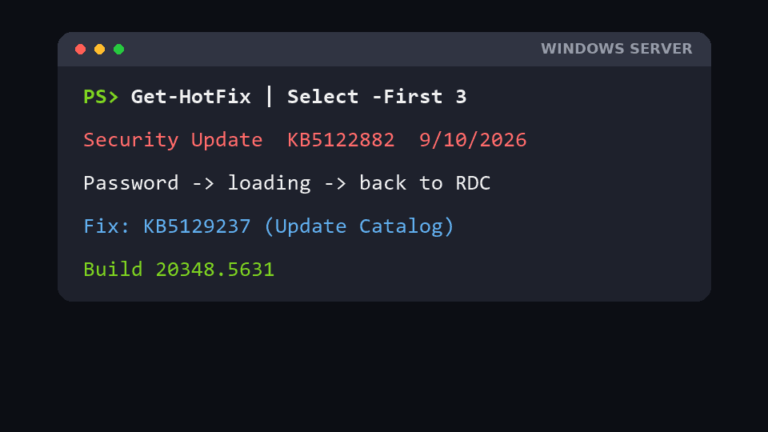
Remote Desktop closes after you enter the password and drops you back at the Remote Desktop Connection window, with no error? On Windows Server after the September 2026 update KB5122882, the fix is the out-of-band KB5129237. Plus the brute-force attempts we found while fixing it, and how we restricted RDP to client IPs with Windows Firewall.

Desktop icons missing in Windows 11: show-icons setting, Desktop icon settings, restarting Explorer, OneDrive and Public Desktop folders, registry values, icon cache and display fixes.

Coolify shows “New Traefik minor version available” and an “Attention required” badge on your server. Here is how I update the Traefik proxy safely, verify it, roll back if needed, and clear the stale warning.

A practical Linux file transfer cheat sheet: when to use scp, rsync, sftp, curl, wget, tar over ssh or netcat, with real output, resume tricks and the trailing-slash trap.
Deleting a Windows local user fails with “The user does not belong to this group” (NET HELPMSG 2237). Here is what I tried, what failed, and the registry fix that finally worked.
What DISM /CheckHealth, /ScanHealth and /RestoreHealth each do, the right order with sfc /scannow, how to repair from a Windows ISO, and how to read the results.
I ran into this on a test box a while back. I had opened port 80 with ufw allow 80. Later I added iptables -A INPUT -p tcp –dport 80 -j DROP because a guide told me to. Port 80 stayed open. So I tried again, this time inserting the rule at the top of…