Linux Privilege Escalation Checks: How to Audit Your Own Server
Privilege escalation is what happens after an attacker, or a buggy script, gets a foothold as a normal user and then gains more rights than that user was supposed to have. On Linux it often needs nothing exotic. Common causes are ordinary misconfigurations: a sudo rule that is too generous, a group that is quietly equivalent to root, a script run by root that anybody can edit, or a package that is months behind on updates. The same checks that a penetration tester runs first are the ones an administrator should run on their own servers before someone else does.
This is a defensive checklist. The listing commands below only read information (the fixes change things, and Lynis writes its own report files), and you should run them only on systems you own or are responsible for. The output comes from a real Ubuntu 24.04 server, with the address and other identifying details removed. For each check you get the command, what a healthy result looks like, and what to do if the result is not healthy.
What you are looking for
Many Linux escalation paths fall into these groups, which the rest of the post covers in order. The list is not exhaustive: NFS exports with no_root_squash, a writable /etc/passwd or /etc/ld.so.preload, and writable systemd unit files are other places to look.
- Sudo rules that allow more than intended.
- SUID and SGID files that run with the owner’s rights, not the caller’s.
- Capabilities handed out on individual binaries.
- Groups that grant root-equivalent access, such as
docker. - Writable files and folders that root later executes or reads: cron jobs, systemd units, scripts and directories in
PATH. - Old software with a known local vulnerability.
Sudo rules
Start with what each user is allowed to run as root. As that user, sudo -l lists the rules that apply to them; as an administrator you can read the sudoers files directly. Edit them only with visudo, which checks the syntax before saving. That catches typos, though not a rule that is valid and still wrong.
What to look for in the rules themselves:
NOPASSWD: ALLfor anyone who does not need it. It turns a stolen session into root with no further step.- A rule that allows an editor, a pager, a shell-capable tool such as
find,vimorless, or an interpreter such aspython. Many such programs can run a shell, and the sudo rule then gives that shell to root. The public GTFOBins list documents which common binaries can do this, and it is a useful reference when reviewing a rule. - Wildcards in an allowed command path or argument, which let the user supply extra arguments or a path of their choosing.
- Rules that allow the user to run a script they can also edit.
The usual fix is to name the exact command with its exact arguments, and to make sure the user cannot write to that command, to its configuration or to the folder it is in. An exact command does not make an inherently dangerous program safe, so check what the program can do, not only how it is named.
SUID and SGID files
When a program file has the SUID bit, it runs with the effective user ID of the file’s owner instead of the user who started it. For root-owned programs such as passwd and sudo that is deliberate. A SUID root program that is unexpected, or that is a general-purpose tool, is a finding. SGID does the same for the group. Linux ignores both bits on scripts, and a filesystem mounted with nosuid ignores them too.
The obvious command is find / -perm -4000 -type f. On a host that runs containers, though, it returns a lot of noise, because container snapshots under /var/lib/containerd or /var/lib/docker can contain their own copies of su, mount and passwd, and they sit on the same filesystem as the rest of the system. On this server, the unfiltered command printed 62 hits, 49 of them inside container snapshots. Pruning those directories gives a list focused on the host itself (container storage still needs its own review):
sudo find / -xdev \( -path /var/lib/containerd -o -path /var/lib/docker \) -prune -o -perm -4000 -type f -print | sort
sudo find / -xdev \( -path /var/lib/containerd -o -path /var/lib/docker \) -prune -o -perm -2000 -type f -print | sort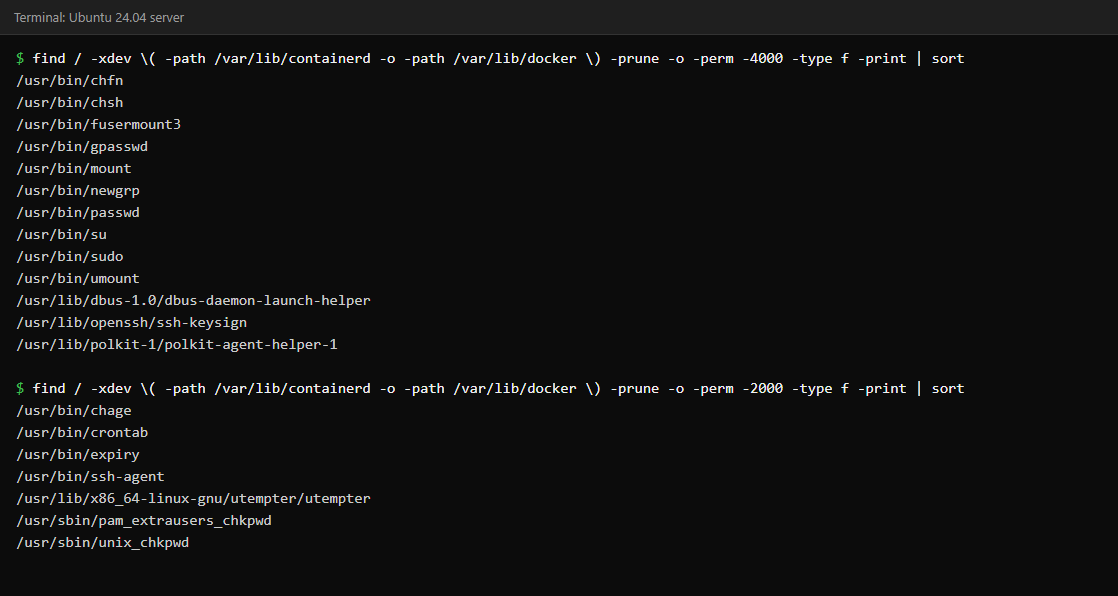
Then ask three questions about each entry. Does it belong to an installed package (dpkg -S /path on Debian and Ubuntu, rpm -qf /path on Red Hat systems)? Is it something this server actually needs? Does it appear on the GTFOBins list? A package-owned file that you recognise is normal. A SUID copy of bash, find or an interpreter in /tmp or a home directory is not. If you do not need a SUID program, remove the bit with chmod u-s /path/to/file, or uninstall the package.
Also compare against a baseline. Save the list once on a clean system and diff it later, so a new SUID file stands out immediately.
Capabilities
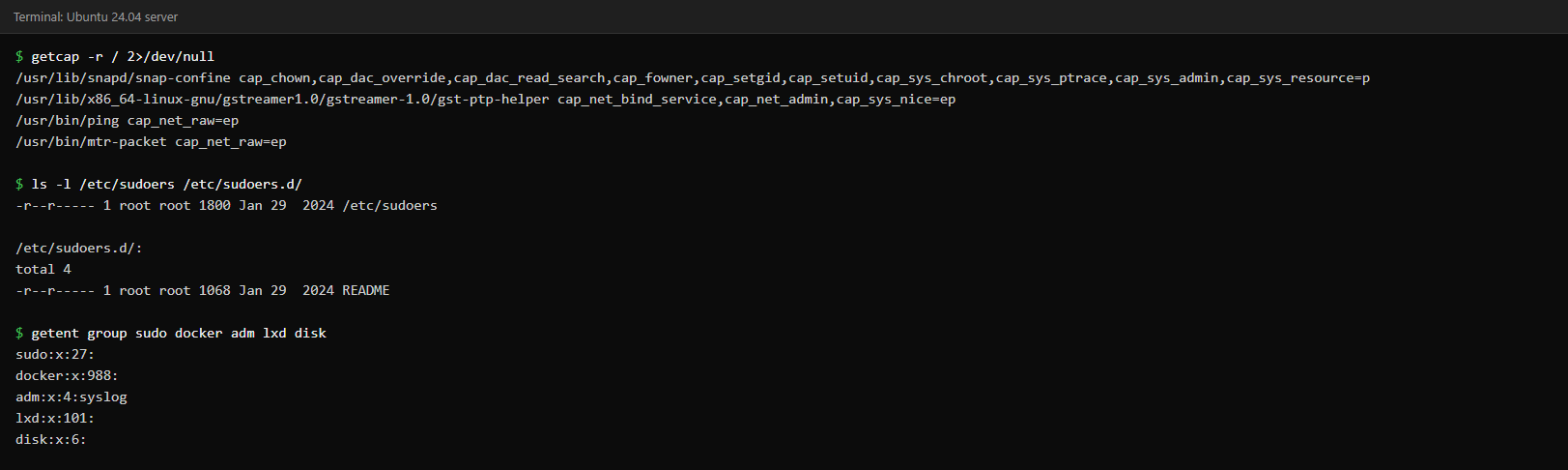
Capabilities split root’s powers into smaller pieces so that a program can have only the one it needs. getcap -r / lists the files that have them. The command comes from the libcap2-bin package on Ubuntu. On this server the list is short: ping and mtr-packet have cap_net_raw, which lets them send raw network packets without being SUID root. Two helpers carry larger sets: snap-confine (part of snapd) and gst-ptp-helper (part of GStreamer). Packaged software is not automatically safe, but these are expected, documented entries; what you are looking for is something you cannot explain. A capability on an interpreter such as python or perl, for example cap_setuid, would be a serious finding because it allows the program to change its user ID to 0.
Groups that are root-equivalent or sensitive
Some groups look harmless and are not:
- docker: anyone who can talk to the Docker daemon can start a container that mounts the host filesystem. Docker’s own documentation states that the
dockergroup grants privileges equivalent to root. - lxd: a similar story for the LXD container manager.
- disk: raw read and write access to disk devices, which bypasses file permissions.
- adm and systemd-journal: not root-equivalent, but they can read logs, which may contain passwords or tokens passed on a command line.
The command getent group sudo docker adm lxd disk systemd-journal shows who is listed in each (a group that does not exist is silently skipped). It lists only supplementary members, so also run id USERNAME for accounts you care about, because a user’s primary group is stored in the account record. On this server only adm has a listed member, and it is the syslog service account. Treat every human in docker as having root, and keep that group as small as the sudo group. The Docker socket works the same way: /var/run/docker.sock is owned by root:docker with mode 660, and a process that can use it, including a container that has it mounted, can control the host through a conventional (rootful) Docker daemon.
Things root runs that others can write to
If root executes a file, loads it as code or reads it as security-sensitive configuration, and a lower-privileged user can modify that file, that user can effectively act as root. Check the obvious places (mode bits do not show permissions granted through ACLs, so use getfacl where ACLs are in use):
- World-writable files in system folders:
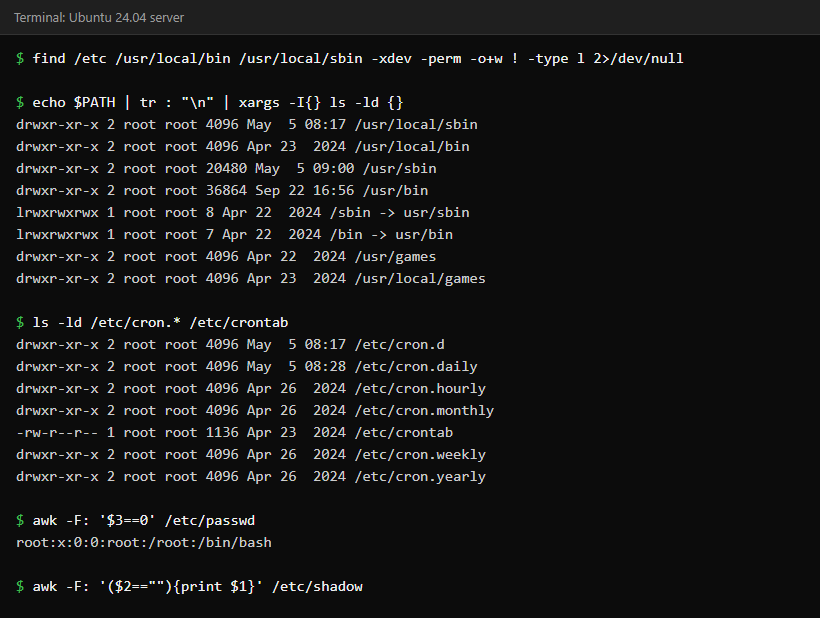
find /etc /usr/local/bin /usr/local/sbin -xdev -perm -o+w ! -type lshould print nothing. The! -type lskips symbolic links, which always show as writable. - Directories in PATH: each one should be owned by root and not writable by group or others, and relative entries such as
.or an empty entry should not be in root’sPATHat all. - Cron and systemd: for every job or unit that root runs, check the script it calls with
ls -l, including every folder above it (namei -l /path/to/scriptshows all of them at once). If the script, or any folder on the way, can be changed by someone else, the job is a way in. Also look at jobs that use*wildcards in a folder that a user can write to. - Extra root accounts:
awk -F: '$3==0' /etc/passwdshould list onlyroot, andsudo awk -F: '($2==""){print $1}' /etc/shadow(it needs root) should print nothing, because an empty password field may allow login without a password, depending on the PAM and service configuration.
Our cron troubleshooting guide and the permissions and groups post cover the cron side and the permission model in more depth.
Patch level
Some local privilege escalation bugs sit in the kernel or in widely installed programs such as sudo or polkit, and the real fix is the vendor’s update (or a documented mitigation until it is available). Check the running kernel with uname -r and pending updates with apt list --upgradable (or dnf check-update); the apt command reports from the last apt update, so refresh the package lists first. On Ubuntu, a file named /var/run/reboot-required means that installed updates have asked for a reboot. Its absence does not prove everything is patched, since services may also need restarting. This server was running kernel 6.8.0-111-generic, had no reboot marker and had a few package updates pending.
Containers on the same host
If the server runs containers, review how they are started. A container started with --privileged, or one that mounts the host root filesystem, is a serious risk, and so is any container that can reach the Docker socket (see the groups section above). Extra capabilities such as SYS_ADMIN widen what a container can do and, depending on mounts, devices and security profiles, can lead to a host escape. Prefer rootless or user-namespaced setups where you can, drop capabilities you do not need, and do not give application containers access to the Docker socket.
Let a tool do the first pass
Checking by hand teaches you what to look at, and a tool covers more ground. Lynis is an open-source auditing tool for Linux and Unix systems (on Ubuntu, sudo apt install lynis). Running sudo lynis audit system produces a report with warnings and suggestions, and writes its log and report files under /var/log. It does not prove that a server is secure, but its findings are a good to-do list, and it is a sensible thing to schedule monthly. Remote login is the usual first foothold, so our SSH hardening checklist is a sensible companion.
A short routine
- Review sudo rules and group membership. Remove anything nobody can justify.
- List SUID, SGID and capability files, with container storage pruned, and save the result as a baseline.
- Check that nothing root runs can be edited by someone else.
- Apply updates, reboot when asked, and re-run the list afterwards.
- Repeat on a schedule, and diff against the baseline.
Common questions
Is a SUID binary always a vulnerability?
No. Programs such as passwd, sudo, su and mount commonly use it so that ordinary users can perform specific, controlled actions. It becomes a problem when the program is unexpected, can run commands or edit files, or can be modified by someone other than root.
Why does find show SUID files inside /var/lib/containerd?
Those are files from container image layers. They are not part of the host’s own programs, but they are on the same filesystem, so a plain find lists them. Prune the container storage directories as shown above.
Does being in the docker group really equal root?
Yes, in practice. Docker’s documentation says the group grants root-level privileges, because a container can mount any host path. Limit it to administrators.
Should I run these checks as root?
Run the read-only listing commands as root so that find can see every directory, but run sudo -l as each ordinary user whose rights you want to review.
Keep reading
- Bootcamp Module 9: Security Baseline for Admins — A baseline of security settings for a Linux server.
- fail2ban vs Cloud Security Groups: What Actually Stops the Bots — Block repeated login attempts at the right layer.
- Common Misconfigurations That Get Servers Popped — The mistakes that most often lead to a breach.