OWASP API Top 10 Through an Ops Lens (No Exploits)
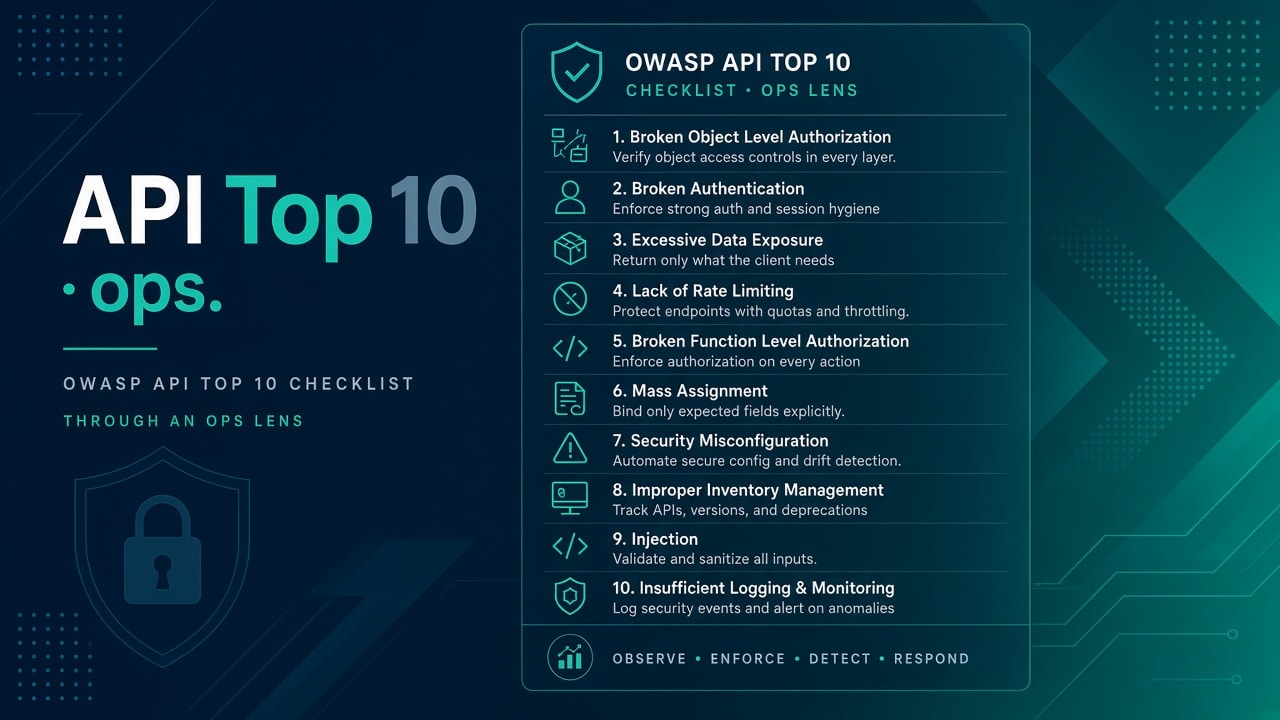
A developer once pasted “OWASP API Top 10” into a ticket and asked me which item we were “failing.” Fair question. Bad framing. OWASP is a shared language for risk themes — broken authz, broken authn, misconfiguration, forgotten endpoints — not a trophy list you check off after buying a scanner.
This post is the ops lens on that list. Developers fix code paths. You reduce blast radius: network exposure, TLS, secret handling, logging, patching, and noticing weird traffic. High-level and defensive only — no attack steps, no PoCs in runbooks. If you need the host-level floor first, start with API security basics for sysadmins.
How to read OWASP as ops (not as a pentester)
For each theme below I care about three questions:
- Can this risk show up because of something I control (listener, route, secret file, package age, egress)?
- How do I check without attacking anyone else’s system?
- What does “good enough for now” look like on a small team?
Common wrong assumption: “AppSec owns OWASP, ops owns SSH.” In practice the breach that hurts most often walks through an exposed admin path, a world-readable env file, or an old v1 hostname nobody decommissioned. That is ops territory whether the ticket says so or not.
Opinion: memorize themes, not the yearly number labels. Labels shift. Exposure, auth, config, inventory, and dependency honesty do not.
Broken object / function authorization — ops angle
Why it hits ops: admin and “support” functions often share the same public VIP as customer APIs. A missing authz check in code is worse when the function is reachable from the internet.
Check:
# what does the edge actually route?
sudo grep -REhn 'location |proxy_pass|server_name' /etc/nginx/ 2>/dev/null | head -60
# which processes listen publicly?
sudo ss -ltnp
Ask product/dev for a written list of privileged routes (/admin, /internal, /support, GraphQL mutations that delete accounts). If that list does not exist, you are guessing.
Fix steps: put admin APIs on a private network or SSO-protected path; split listeners when you can; do not publish admin ports in the same security group as /v1.
Success: from the public internet you cannot reach admin listeners (connection refused / timeout). From the jump host or VPN you can, with auth. Document which hostname is privileged.
If still stuck: you may be fighting DNS aliases. Old CNAMEs keep “retired” admin hosts alive — triage with DNS not resolving habits (prove what name resolves where before you argue about nginx).
Broken authentication
Why ops cares: password login left on token-only APIs, test keys in tickets, long-lived tokens in .env files that got copied to a backup share.
Check:
ls -la /etc/myapp/ /opt/myapp/*.env 2>/dev/null
# look for mode 644/666 and files named *test* *staging* on prod hosts
sudo journalctl -u myapi --since "1 hour ago" | grep -E '401|403' | tail
Spikes of 401/403 after a deploy can mean clients broke — or someone is stuffing credentials. Either way you want the signal.
Fix: store secrets root-owned mode 640; rotate when people leave; remove password grant paths on APIs that should be token-only (coordinate with app owners); never bake production secrets into images pushed to shared registries.
Success: no world-readable secret files; staging keys do not work against prod; auth failure rate has a baseline you recognize.
Unrestricted resource consumption
You may not write the expensive endpoint. You will get the pager when CPU, memory, or egress bills spike.
Check: rate limits and timeouts at the edge; connection caps on the app or DB pool; host pressure with load and memory context — high load average, OOM killer.
# example: confirm a timeout exists (nginx)
sudo grep -REn 'proxy_read_timeout|limit_req' /etc/nginx/ 2>/dev/null
Fix: set read/send timeouts; add a basic request rate limit on expensive routes; cap worker connections; move heavy exports off the public API path.
Success: a runaway client gets 429 or slow-fails without taking the box to OOM. Healthchecks stay honest — see timeouts and healthchecks.
Tradeoff: aggressive limits will anger a legitimate batch job. Prefer route-specific limits over a global “everyone gets 10/min” hammer unless you know the traffic.
Sensitive business flows and “staging is prod with a different DNS”
Ops rarely designs checkout or OTP flows. You can ensure staging is not a full copy of prod with real customer data, and that webhook receivers are not open relays on a public IP.
Check: does staging share the prod database? Do webhook URLs require a shared secret header? Are “debug” callbacks still in DNS?
Fix: separate data; require secrets on webhooks; remove debug callbacks when the feature ships.
Success: a stranger hitting the webhook URL without the secret gets rejected; staging cannot mint prod side effects.
SSRF-class risks as surprising egress
You will not always recognize “SSRF” in a ticket. You will notice the app server suddenly talking to link-local metadata IPs or random internal RFC1918 ranges it never needed.
Check:
# what is this host allowed to talk to?
# cloud: review security group egress and NACLs
# host: ss / conntrack samples during a suspicious spike
sudo ss -tnp | head -40
Fix (ops controls): tighten egress allowlists where the platform allows; block cloud metadata from app tasks that do not need it; keep a short runbook note for “who may call metadata.”
I am deliberately not walking attack reproduction. If your AppSec team wants a lab, use systems you own — lab setup.
Security misconfiguration
Default credentials, verbose errors on public APIs, directory listings, outdated packages, expired certs. This is the most “ops-native” OWASP bucket.
Check:
# package age / pending updates (Debian/Ubuntu example)
apt list --upgradable 2>/dev/null | head
# cert dates
echo | openssl s_client -connect api.example.com:443 -servername api.example.com 2>/dev/null | openssl x509 -noout -dates
Patch with discipline (apt/dnf). Fix TLS hygiene before arguing about fancy headers (certs). Turn off directory listing and default server banners when they leak stack versions you do not need public.
Success: no default admin passwords on anything you deploy; public errors are boring; certs renew before humans notice.
Inventory and outdated APIs
Old /v1 endpoints nobody owns are gifts to attackers and mysteries to monitoring. Decommission with DNS and gateway changes, not vibes.
Check: compare gateway/nginx route lists to the service catalog. Hit deprecated hostnames from a lab machine you own — expect NXDOMAIN or a deliberate 410, not 200.
Fix: remove server blocks; drop DNS; close security group holes; tell clients a kill date in writing.
Success: deprecated names fail closed; monitoring no longer alerts on ghosts.
Unsafe consumption of APIs
Your services call others. Pin versions, validate TLS, set timeouts, and monitor dependency health. A vendor that hangs forever will hang your workers forever.
# in app config / compose: confirm timeouts exist (example pattern)
grep -REn 'timeout|TIMEOUT' /etc/myapp/ /opt/myapp/ 2>/dev/null | head
Success: dependency outage degrades a feature, not the whole host. Circuit breakers and timeouts are boring on purpose.
What not to do
Do not practice attacks on systems you do not own. Do not paste exploit PoCs into runbooks. Lab on your VMs with permission. Pair with the host baseline in Module 9 — security baseline so API talk does not skip SSH, patching, and disk reality.
A one-hour ops pass (do this on one API)
- Export listeners + edge routes into the ticket.
- Prove HTTPS works and HTTP does not serve the API.
- Prove admin paths are not on the public VIP.
- Prove secret files are not world-readable.
- Prove one expensive route has a timeout or rate limit.
- Note one outdated hostname to kill this month.
That is more valuable than a slide deck that lists all ten OWASP names.
FAQ — real doubts
Is this a developer-only list?
No. Many items have operational controls: exposure, TLS, secrets on disk, egress, inventory, patching, timeouts. Code authz bugs still need developers — your job is not to pretend otherwise.
Do I need to memorize all ten numbers?
No. Memorize themes: authz reachability, authn hygiene, resource abuse, misconfig, inventory, unsafe dependency calls. Numbers change across OWASP editions.
Can I “scan” my way to compliance?
Scanners help find noise. They do not replace knowing which hostnames you publish. I have watched teams fail audits with green scan badges and three forgotten admin vhosts.
What do I say in a design review as ops?
Ask: where does this listen, who can reach it, where do secrets live, what is the timeout, how do we retire it. That set beats buzzword bingo.