What Is Linux Operating System? A Plain 2026 Answer
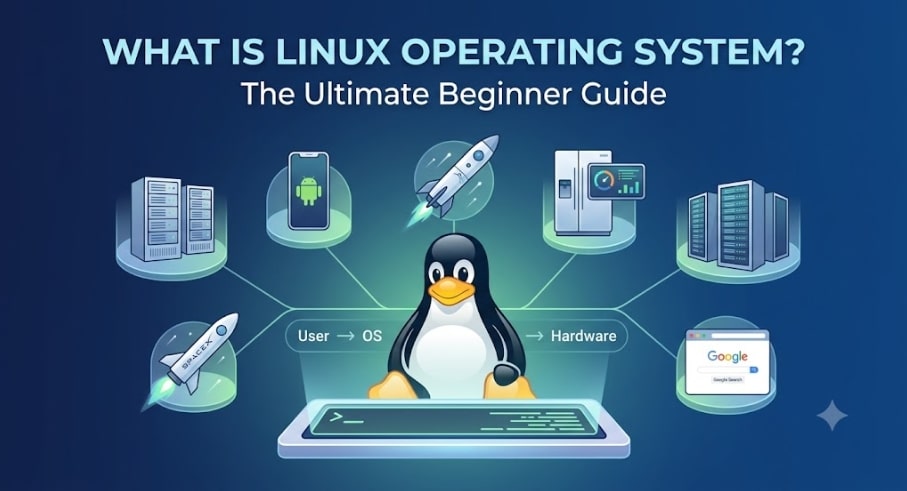
What is Linux operating system, really? Ask ten people and you’ll get ten vague answers involving hackers, penguins, and black terminal windows. Meanwhile the honest answer is sitting in your pocket: if you own an Android phone, you’ve been running Linux for years. It also answered your last Google search, streamed your last Netflix episode, and — as I’ve covered before — flew a helicopter on Mars.
Here’s the explanation I wish someone had given me on day one: what an operating system even is, what makes Linux different, where it came from, how it compares to Unix and Windows, and which distribution I’d actually install in 2026.
First: What Is an Operating System?
Before Linux makes sense, this has to. An operating system (OS) is the software that sits between you and the hardware — a middleman. Your keyboard, screen, disk, and wifi chip are just electronics; they don’t know what “open a browser” means. The OS translates. You click, the OS tells the hardware what to do, the hardware obeys, and the OS hands the result back to you. No OS, and your computer is an expensive brick.
Operating systems come in flavours for every context: desktop OSes (Windows, macOS, Ubuntu Linux), server OSes (Windows Server, Red Hat Enterprise Linux), mobile OSes (Android, iOS), embedded OSes inside routers, TVs and appliances, and real-time OSes (RTOS) in medical devices, car ECUs and aerospace systems where a late response is a failed response.
Keep that list in mind, because here’s the punchline of this entire article: Linux shows up in every single one of those categories.
What Is Linux Operating System, Exactly?
Linux is a free and open-source operating system. Those two words carry precise meanings that beginners often blur together:
Free means you can download, install and run the Linux operating system on any machine without paying for a licence. (A nuance we’ll revisit: with Red Hat Enterprise Linux, the software is free — you pay for the support subscription.)
Open source means the source code — the actual recipe the OS is built from — is public. Anyone can read it, study it, modify it, and redistribute their modified version. Compare that with Windows: you use it exactly as Microsoft ships it, and the code is a trade secret.
That open-source nature has two enormous consequences. First, a worldwide community of developers continuously improves Linux — it’s arguably the largest collaborative project in human history, coordinated through kernel.org. Second, because anyone can modify and redistribute it, hundreds of tailored versions exist — called distributions — each tuned for a purpose: beginner desktops, enterprise servers, security testing, tiny containers. More on those shortly.
What people keep Linux around for, after three decades, is usually three things: stability (servers run for years without a reboot), security (a strict multi-user permission model designed in from day one), and flexibility (it scales from a lightbulb to a supercomputer).
One expectation to set early: Linux is not famous for its graphical interface — desktop environments exist and some are lovely, but corporate Linux servers run with no GUI at all. Administrators manage everything through the command line. That’s not a limitation; it’s the source of Linux’s speed, scriptability, and remote-management power, and it’s why every Linux course (including my learning roadmap) is built around the terminal.
A Short History: From Unix to a Finnish Student’s “Hobby”
You can’t explain Linux without Unix, so here’s the thirty-second version of thirty years.
1969–70, Bell Labs. After stepping away from the ambitious Multics project (a collaboration between AT&T, GE and MIT), Ken Thompson and Dennis Ritchie built Unix at AT&T’s Bell Labs — a revolutionary multi-user, multitasking OS whose design ideas still define computing. One catch: Unix was proprietary. Using it meant licences, lawyers, and vendor lock-in.
1983, the GNU Project. Richard Stallman launched GNU (“GNU’s Not Unix”) to build a completely free Unix-like system. The project produced superb tools — compilers, shells, utilities — but was missing the central piece: a working kernel, the core that talks to hardware.
1991, Helsinki. A 21-year-old student named Linus Torvalds started writing a kernel as a personal project and announced it on Usenet with words that became legend: “I’m doing a (free) operating system (just a hobby, won’t be big and professional like gnu).” Version 0.01 arrived in September 1991; by 0.02 it was functional. Crucially, Linux was inspired by Unix but written from scratch — not copied — a distinction that later saved it in court.
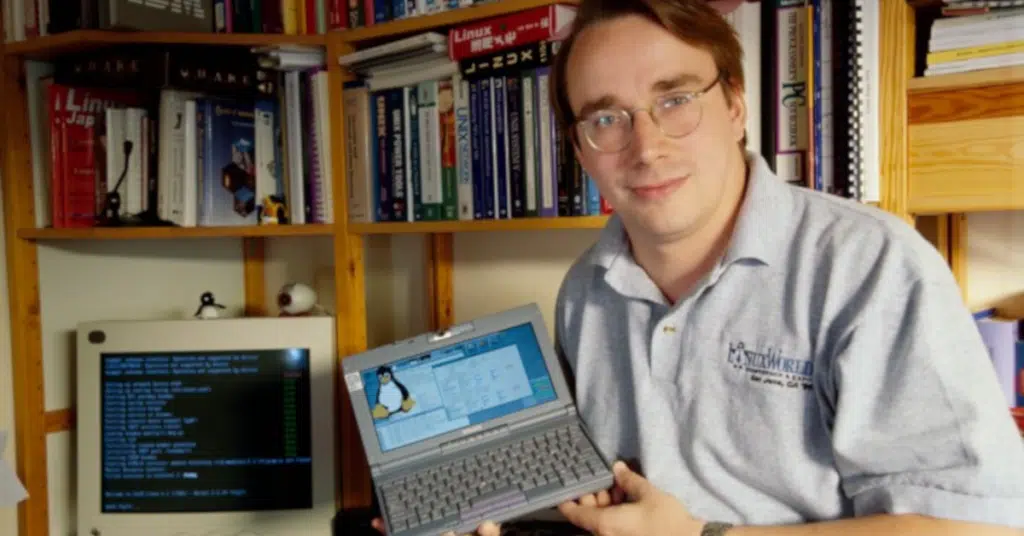
Torvalds’ kernel plus GNU’s tools formed a complete free operating system. The world calls the combination Linux; purists argue for “GNU/Linux,” and knowing that debate exists is worth one line in any interview.
Then it snowballed. Early distros like Slackware and Debian (1993) made it installable by mortals. Version 1.0 shipped in 1994 with 176,000 lines of code. Red Hat and SUSE brought commercial support in the late 90s, making Linux safe for business. Google built Android on the Linux kernel in 2007, putting it in billions of pockets. Today the kernel is tens of millions of lines, and the “hobby” runs most of the internet, every one of the world’s TOP500 supercomputers, the New York Stock Exchange, NASA and Department of Defense systems, and render farms at Pixar and Netflix.
Not bad for something that wouldn’t be “big and professional.”
Linux vs Unix: What’s the Difference?
Since Linux is Unix-like, beginners reasonably ask what separates them. The short answer: philosophy and freedom.
Origin and licence. Unix (1970, Bell Labs) was proprietary — companies licensed it and sold closed variants: Oracle’s Solaris (via the 2010 Sun acquisition), HP’s HP-UX, IBM’s AIX. Linux (1991) is free and open source under the GNU GPL — nobody owns it in the way Microsoft owns Windows.
Hardware. Commercial Unix typically ran only on its vendor’s hardware — much like macOS only runs on Apple machines. Linux runs on practically anything: Intel/AMD PCs, ARM phones and Raspberry Pis, mainframes, games consoles, supercomputers.
File systems. Unix variants support a handful of file systems; Linux supports dozens (ext4, XFS, Btrfs, and many more — file systems get their own deep-dive later in this series).
Today. Proprietary Unix survives in shrinking legacy niches; Linux took its ideas, removed its restrictions, and inherited its world.
Linux vs Windows: The Interview Classic
“Why would you choose Linux over Windows?” is a genuine technical-interview staple, so here’s the comparison that matters, honestly stated:
| Linux | Windows | |
|---|---|---|
| Source code | Open source — read, modify, redistribute | Proprietary — Microsoft only |
| Cost | Free (RHEL: free software, paid support subscription) | Paid — bundled into your laptop’s price even when it feels “free” |
| Interface | Choice of desktops (GNOME, KDE, XFCE); servers run CLI-only | One standard GUI, beginner-friendly, less customisable |
| Command line | The core of the OS; scripting is first-class | CMD and PowerShell exist — PowerShell is genuinely powerful but most users live in the GUI |
| Software installs | Package managers (apt, dnf, pacman) resolve dependencies automatically | Mostly standalone .exe installers or Microsoft Store |
| Security | Strong multi-user permission model; far less malware | Much improved (Defender etc.) but the biggest malware target on Earth |
| Stability | Famous for multi-year uptimes; happy on old hardware | Stable, but degrades over time (registry bloat, background processes) |
| File system | ext4/XFS/Btrfs; one hierarchy starting at /; “everything is a file” | NTFS/FAT32; drive letters (C:, D:) |
Two honest footnotes a good interviewer will respect. First, on security: Linux’s advantage comes primarily from its permission architecture and code transparency — partly also from being a smaller desktop target — but “Linux can’t get malware” is a myth; misconfigured Linux servers get compromised daily. Second, on desktops: for a non-technical home user, Windows remains the easier choice. Linux wins where it matters professionally — servers, cloud, automation — which is why it’s the career skill worth learning.
Linux Distributions: Which Flavor Should You Pick?
Because anyone can modify and redistribute Linux, hundreds of distributions (“distros”) exist — same kernel, different packaging, tools, and philosophy. Here are the ones worth knowing, grouped by what they’re for:
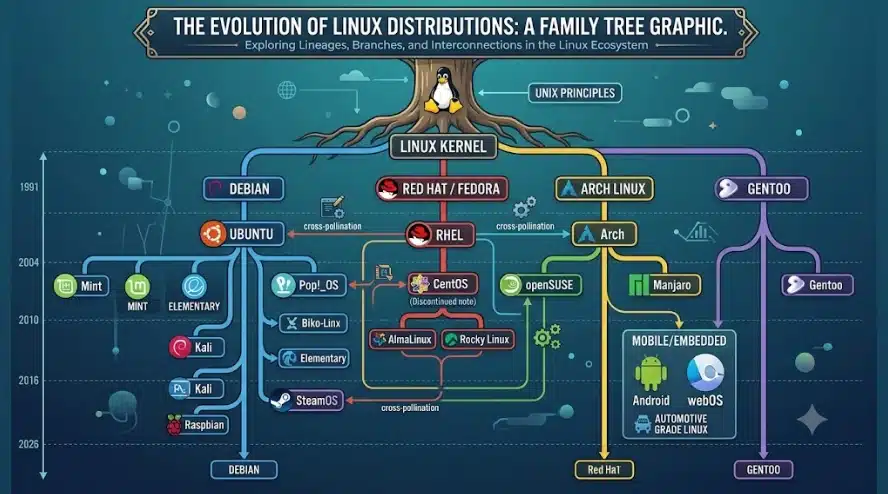
For beginners and desktops: Ubuntu (Debian-based, backed by Canonical, the friendliest documentation on the internet) and Linux Mint (Ubuntu-based, traditional desktop feel, media codecs included).
For enterprises and jobs: Red Hat Enterprise Linux (RHEL) dominates corporate server rooms — long-term support, certified stability, paid subscriptions. Fedora is Red Hat’s fast-moving innovation lab where features debut before reaching RHEL. And here’s the update you won’t find in older courses: CentOS, the free RHEL clone every tutorial used to recommend, is discontinued (replaced by CentOS Stream, which serves a different purpose). Its true successors are Rocky Linux and AlmaLinux — free, 1:1 RHEL rebuilds created by the community for exactly this reason.
For tinkerers: Arch Linux (rolling release, build-it-yourself philosophy; Manjaro makes Arch approachable), Gentoo (compile everything from source), and Slackware (one of the oldest, proudly minimal). openSUSE offers both a rolling release (Tumbleweed) and a stable one (Leap).
For special jobs: Alpine Linux (tiny and security-focused — the default base for Docker containers) and Kali Linux (purpose-built for penetration testing and digital forensics).
My recommendation if your goal is a Linux job: learn on Rocky Linux or AlmaLinux. The majority of enterprise environments — very much including Indian corporates — run RHEL or its derivatives, and the RHCSA certification targets exactly this family. Use Ubuntu for casual daily practice if you like; do your server practice on the RHEL family. (Older material will tell you CentOS — same logic, outdated answer.)
So, Should You Learn It?
Quick recap of what is Linux operating system in one breath: a free, open-source, Unix-inspired OS, born as a student’s hobby in 1991, that now runs the majority of the world’s servers, all of its supercomputers, most of its phones, and a growing share of everything else — available in hundreds of distributions, administered through a command line, and hired for everywhere.
That last point is the practical one. Developers, universities, governments (NASA, the DoD, the FAA), banks (Bank of America, the NYSE), retailers (Walmart, McDonald’s), and every major tech company (Google, Amazon, Meta, even Microsoft) run Linux and continuously hire people who can administer it.
If that answered the “what,” the next questions have answers on this site too: is Linux worth learning in 2026 covers the career case and salaries, and the step-by-step Linux roadmap for beginners turns curiosity into a 12-week plan. The terminal is less scary than it looks — and it’s waiting.
FAQ
What is Linux operating system in simple words? Linux is a free, open-source operating system — the software layer between you and your computer’s hardware. Anyone can use, modify and share it, which is why it comes in hundreds of versions and runs on everything from phones to supercomputers.
Is Linux completely free? What about Red Hat? The software is free to download and run, including Red Hat Enterprise Linux itself. What Red Hat charges for is the support and update subscription — which enterprises gladly pay. If you want RHEL without the subscription, Rocky Linux and AlmaLinux are free 1:1 rebuilds.
Is Linux the same as Unix? No. Unix (1970, Bell Labs) was proprietary; Linux (1991) is a free, open-source system inspired by Unix but written from scratch. Commercial Unix variants like Solaris, HP-UX and AIX still exist in legacy niches, but Linux has taken over the roles Unix once held.
Which Linux distribution is best for beginners? Ubuntu or Linux Mint for a friendly desktop experience. If your goal is a sysadmin or cloud job, practice on Rocky Linux or AlmaLinux — the free equivalents of the Red Hat Enterprise Linux that dominates corporate environments. Avoid old advice recommending CentOS; it’s discontinued.
Why does Linux use the command line instead of a GUI? Desktop Linux has full graphical interfaces, but servers deliberately run without one: the command line is faster, uses fewer resources, works over remote SSH connections, and can be scripted to automate anything. Professional Linux skill essentially is command-line skill.
Can Linux replace Windows for normal home use? For browsing, media and office work — yes, comfortably, and distros like Mint make the switch gentle. For specific Windows-only software and some games, you may still need Windows. Professionally, though, the two aren’t really competitors: Windows won the desktop, Linux won the server, cloud and embedded world.