SELinux Permission Denied: Read AVC Denials Without Rage-Quitting
You moved a web root, fixed Unix permissions to 755, and nginx still gets Permission denied. Or a container volume can’t write. Or SSH keys “look fine” but something smells weird. On RHEL, Rocky, Alma, Fedora — check SELinux before you chmod 777 and lose dignity.
The common reflex is to rage-quit into setenforce 0. Reading the AVC denial instead is a skill you can learn in an afternoon. Chai helps.
Is SELinux even in play?
getenforce
sestatus
Enforcing means policy bites. Permissive logs but allows. Disabled means you’re not debugging SELinux today (other problems still exist).
Debian/Ubuntu usually default to AppArmor instead — different tool, same “it’s not always chmod” lesson.
Find the denial (AVC)
sudo ausearch -m AVC -ts recent
# or
sudo journalctl -t setroubleshoot -n 50 --no-pager
sudo grep denied /var/log/audit/audit.log | tail -20
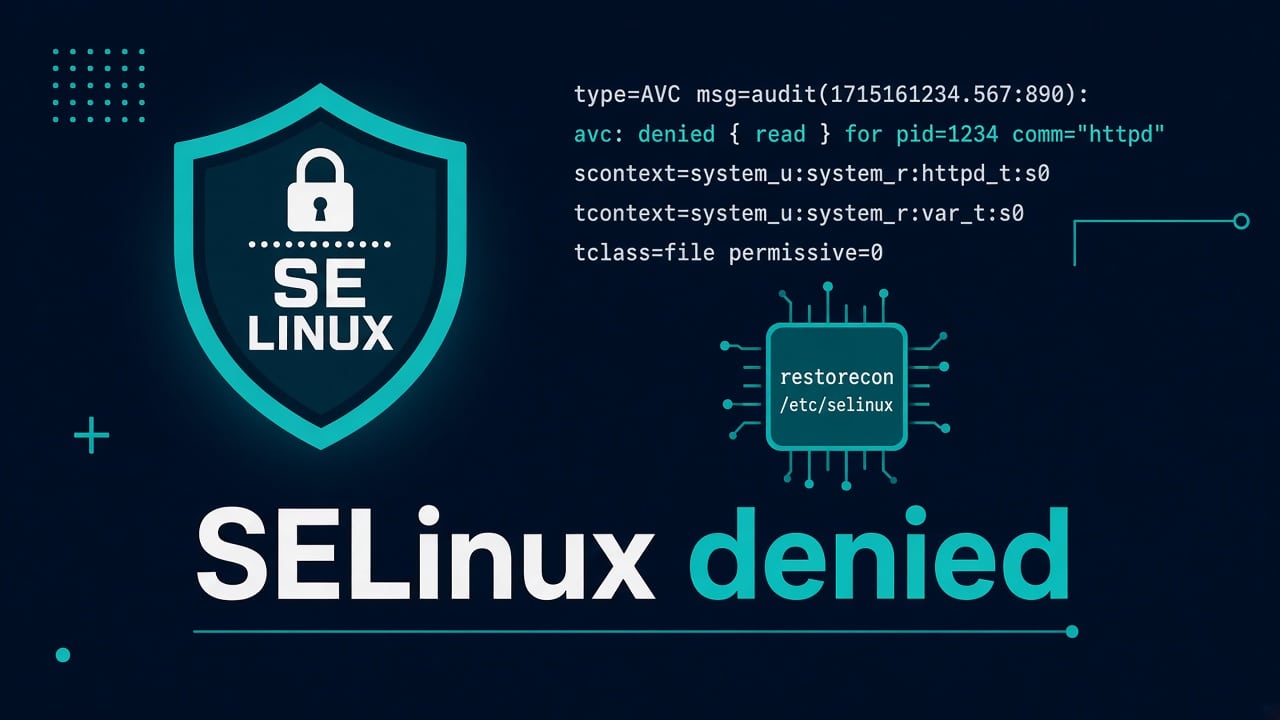
You’ll see something like: nginx (httpd_t) tried to read a file labeled user_home_t or connect to a port it isn’t allowed to. That’s gold. Without the AVC, you’re guessing.
Don’t start with setenforce 0 on prod
Permissive mode is a diagnostic switch for a lab or a short controlled test. Leaving production permissive forever means you carry policy debt and a false sense of “fixed.” If you must test:
sudo setenforce 0   # temporary test ONLY
# reproduce
sudo setenforce 1
If the problem vanishes only while permissive, congratulations: it’s policy. Now fix the label or boolean, don’t stay permissive.
Contexts: ls -Z is your friend
ls -Z /var/www/html
ls -Zd /var/www/html
# compare to a known-good path
ls -Z /usr/share/nginx/html
Moved files from /home/you/project with cp/rsync/mv often keep wrong labels. Fix:
sudo restorecon -Rv /var/www/html
# or set explicitly when you know the type
sudo chcon -R -t httpd_sys_content_t /var/www/html
restorecon uses the policy file context map — prefer it over random chcon when possible so labels survive relabels.
Booleans — intentional knobs
getsebool -a | grep httpd
sudo setsebool -P httpd_can_network_connect 1
Example: nginx/Apache needs to talk to a backend on another port — there’s often a boolean for that. -P persists. Don’t flip every boolean to on; read what it does.
Custom ports
Listening on 8088 instead of 80? Policy may not allow httpd_t to bind it until you add a port type:
sudo semanage port -l | grep http
sudo semanage port -a -t http_port_t -p tcp 8088
Port-already-in-use is still a separate issue: address already in use.
How this shows up as “random” outages
- nginx 502 because proxy connect denied — see 502 checklist then come back for AVC
- App can’t write uploads — Unix perms fine, context wrong
- DB socket access weirdness after a move — MySQL connection refused may be the symptom
- Compose volume mounts need
:Z/:zon some setups — Compose for ops
setroubleshoot and audit2why
sudo yum install -y setroubleshoot-server  # if missing on RHEL-ish
sudo ausearch -m AVC -ts recent | audit2why
It suggests booleans or allow rules. Read suggestions; don’t paste unknown local policy modules into prod without understanding.
Incident checklist specific to SELinux
- getenforce
- Reproduce once
- ausearch / journal AVC
- ls -Z on the path
- restorecon or boolean or port — matching the denial
- retest with enforcing on
- document the permanent fcontext/boolean in the role/runbook
If the service unit itself fails for non-SELinux reasons, still use journalctl triage. Ship the AVC text in the ticket; “SELinux bad” without the denial wastes everyone’s time.
For fleet baselines, bake contexts into Ansible roles. Humans forget restorecon after every rsync; playbooks don’t — when written well.
Real-world SELinux cases
Situations where SELinux is the reason, and how to fix them without turning it off.
Example: the home-directory webroot
Say a developer insists on serving a site from /home/dev/site. The chmod looks perfect, yet SELinux says no. The usual fix is to move the site under /var/www, update the document root and run restorecon -R on it. A custom location can also work if you set the right SELinux labels on it, but that is harder to audit later. Broad access to home directories creates unnecessary exposure.
SSH and SELinux
Wrong contexts on ~/.ssh can break key auth in odd ways. Fix contexts rather than disabling SELinux:
restorecon -Rv /home/user/.ssh
Still see Permission denied (publickey)? Classic checklist: SSH publickey. Hardening habits: SSH hardening.
Automation angle
Ansible has seboolean and file context modules. Bake restorecon into deploy roles so you’re not the hero after every rsync. First role patterns: Ansible first useful role.
What not to do
- chmod 777 to “fix SELinux” (it doesn’t; it just opens other holes)
- Disable SELinux in grub because a blog from 2014 was angry
- Ignore AVC logs while restarting services in a loop — also check systemd failures
Destructive panic commands hall of fame: can wipe a server.
File context persistence with semanage fcontext
If your app lives in /opt/myapp/html, teach policy permanently:
sudo semanage fcontext -a -t httpd_sys_content_t '/opt/myapp/html(/.*)?'
sudo restorecon -Rv /opt/myapp/html
chcon alone can be wiped by a full relabel. semanage fcontext + restorecon survives.
Writable directories need different types
Static content vs upload dirs: uploads often need httpd_sys_rw_content_t. If uploads fail with permission denied while reading HTML works, check write contexts before blaming PHP.
ls -Zd /var/www/html/uploads
sudo semanage fcontext -a -t httpd_sys_rw_content_t '/var/www/html/uploads(/.*)?'
sudo restorecon -Rv /var/www/html/uploads
Containers: :z vs :Z
Docker/Podman volume flags relabel for sharing (:z) or private (:Z). Wrong choice → permission denied inside the container despite Unix 777. Prefer understanding over stacking chmod. Ops Compose notes: Docker Compose for ops.
nginx proxy to unusual ports
Connecting to a local app on 3000 may need httpd_can_network_connect or a proper SELinux port type for the destination. Symptoms look like 502 Bad Gateway with AVC denials in audit.log. Fix policy; don’t only raise timeouts.
Module building — last resort
sudo ausearch -m AVC -ts today | audit2allow -M mylocal
# review mylocal.te BEFORE
sudo semodule -i mylocal.pp
Never install a module you haven’t read. Over-permissive local modules are how SELinux becomes decoration.
tmp and runtime directories
Services writing to /tmp or custom run dirs can hit weird transitions. Prefer proper runtime dirs via systemd RuntimeDirectory= so labels land correctly. Random world-writable temp dirs are a smell.
Troubleshooting nginx error.log vs audit.log
nginx says permission denied; junior fixes chmod. Senior opens audit.log. If there’s an AVC, fix the AVC. If there’s no AVC and Unix mode is wrong, fix Unix mode. Two different worlds — check both in under a minute.
sudo tail -20 /var/log/nginx/error.log
sudo ausearch -m AVC -ts recent | tail -20
ls -lZ /path/to/file
Document the exception
Every boolean flipped or local module installed belongs in the runbook with a date and why. Future-you on a new distro major version will need that trail. Put it next to the Ansible role so the fleet doesn’t drift one “hotfixed” node at a time.
FAQ
Is SELinux required?
On many enterprise distros it’s the default security module. Learning to read AVCs is cheaper than disabling it across a fleet.
AppArmor vs SELinux?
Different implementations. Skills transfer: denials have logs; fix policy or paths.
Why did it work until I updated?
New package policy, new path, or a container engine change. Diff the AVC timestamp with your change window.
Can high load be SELinux?
Rarely primary. Check load average for CPU/IO wait. SELinux denials are usually fail-closed on a path, not slow-everything.
Where to practice?
Lab VM in enforcing mode. Break a webroot label on purpose. Fix with restorecon. Then graduate via bootcamp / courses.