Linux Networking Basics for Sysadmins: IP, DNS, ss, curl
Day-1 sysadmin networking isn’t CCNA cosplay. It’s answering: can this box reach that thing, on which path, with which name, listening on which socket?
Build the habit in a lab (lab setup) and keep Bootcamp Module 5 nearby. When DNS is the villain, use DNS not resolving.
Triage order I actually use
- Local IP and link
- Route to target
- DNS name → address
- Listener on the port
- Client test (
curl/openssl s_client) - Firewall / security group (last mile, not first guess every time — but don’t forget)
Interfaces and addresses
ip -br a
ip route
ip route get 1.1.1.1
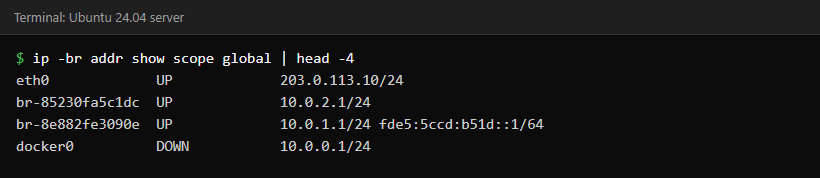

ip route get tells you which interface and gateway a packet would use. Faster than staring at a routing table hoping for enlightenment.
DNS: names are where tickets hide
resolvectl status 2>/dev/null || cat /etc/resolv.conf
getent hosts api.internal.example
dig +short api.internal.example

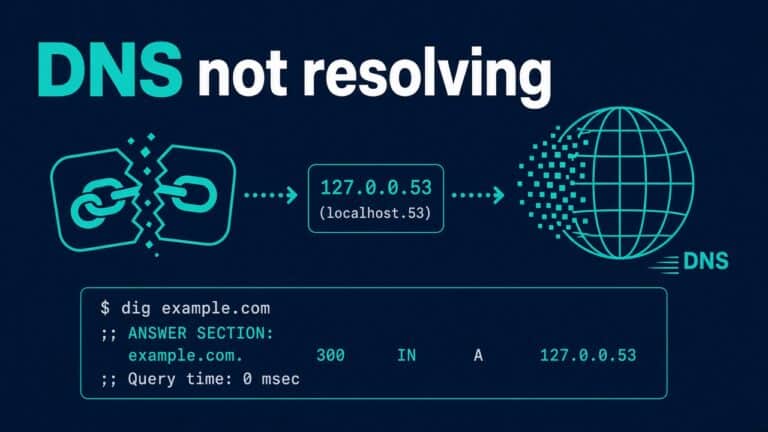
Apps often bypass what you think they use. Stub resolvers on Ubuntu (127.0.0.53) confuse juniors. Follow the checklist post above before rebuilding the world.
ss replaced your netstat muscle
sudo ss -ltnp
sudo ss -lunp
sudo ss -tp | head
Listening TCP, listening UDP, established with processes. When the port is busy: port already in use. When nginx can’t reach upstream: 502 playbook.
curl as a sysadmin tool
curl -vI https://example.com
curl -o /dev/null -s -w '%{http_code} %{time_total}\n' https://example.com/health
curl --connect-timeout 3 --max-time 10 http://127.0.0.1:8080/health
Timeouts matter. Infinite hangs aren’t “patience,” they’re missing budgets. TLS expiry is a separate pager — cert expired.
Firewall notes without the rabbit hole
Host firewalls (nft/firewalld/ufw) and cloud security groups both exist. Bots hitting SSH need layered thinking — fail2ban vs security groups. Don’t open MySQL to the world to “test”: connection refused is often a gift.
Connectivity ≠ application health
TCP connect can succeed while the app returns 500. Measure both. For APIs you run, healthchecks belong in monitoring — REST healthchecks for ops.
When to escalate
Escalate when you’ve proven the packet leaves your host and dies in a network you don’t own, or when carrier/cloud path checks need another team’s tools. Bring evidence: timestamps, curl -v, ss, traceroute samples. Escalations without evidence become hot potato.
Keep a short personal glossary: ARP vs DNS vs route vs firewall. Mixing those words in a bridge call wastes minutes you do not have.
Edge cases that waste an afternoon
These look like application bugs until you test the network layer by layer.
Localhost lies and “it works on the server”
Binding on 127.0.0.1 vs 0.0.0.0 changes who can connect. Developers bind localhost; ops opens a security group; nobody can talk; everyone blames DNS. Check listeners with ss before you touch firewall rules.
sudo ss -ltnp | grep 8080
curl -v http://127.0.0.1:8080/health
curl -v http://$(hostname -I | awk '{print $1}'):8080/health
MTU and weird partial failures
VPN paths and some clouds introduce MTU pain: small packets work, large uploads hang. It’s not day-one common, but when symptoms are “SSH works, big scp dies,” put MTU on the suspect list after the basics.
HTTP vs TLS troubleshooting split
If port 80 works and 443 fails, you’re in certificate or TLS config land. If both fail, you’re in network/firewall/listen land. Keep the split clean so you don’t renew certs for a down interface. Cert playbook: SSL expired.
Name-based virtual hosts
curl -H 'Host: app.example' http://127.0.0.1/ tests vhost routing without DNS. Handy when DNS isn’t ready or you’re on a jump host. For broken proxies, keep 502 bookmarked.
Security groups and the “I opened everything” phase
Juniors open 0.0.0.0/0 on wide ports to unblock demos. Seniors open the least needed CIDR and remove temporary rules the same day. Track temporary holes in the ticket. Pair host hardening with cloud rules — fail2ban vs SG — and keep SSH boringly tight via SSH hardening.
A one-page network runbook template
Symptom:
Source host:
Destination:
Port/proto:
Change window?:
Already tried:
ip route get:
ss snippet:
dig/getent:
curl -v result:
Fill it during lab incidents until it’s automatic. Interviewers hear the structure even when they don’t see the paper — practice with scenarios.
Where networking meets Bash and APIs
You’ll wrap curl healthchecks in scripts, log failures, and schedule them. That’s Bash for ops plus API healthchecks, not a separate universe.
UDP, DNS, and “why is dig fine but the app isn’t”
Applications may cache DNS, use hard-coded IPs, or talk to a different name than you tested. Always ask which name and which library path. Flushing a cache might help; fixing the record at the source is better.
Change windows and network surgery
Route changes and firewall edits deserve the same caution as database failovers. One rule at a time. Prove SSH still works before you disconnect your only session. Console access is the parachute — same lesson as SSH hardening break-glass habits.
Documenting “normal”
Capture a healthy ss -ltnp, a healthy route table, and a healthy resolver config in your lab notes. Diff against them when something smells wrong. Observability starts as text files — then grows into Module 8.
Traceroute judgment
traceroute / mtr help when the path is wrong, not when the app is broken. Stars in the output aren’t always packet loss — some hops don’t ICMP back. Use path tools after local listen and DNS checks, not before.
mtr -rwzc 50 example.com
# or
traceroute -n example.com
Time sync quietly breaks TLS and logs
Far-skewed clocks make certificates look invalid and log correlation impossible. Confirm chrony/ntp before you replace a cert in panic. Then, if it really is expiry, follow cert expired.
timedatectl
chronyc tracking 2>/dev/null || true
Cloud metadata and “why is there another IP”
Cloud VMs often have a primary interface plus metadata routes. Don’t delete routes you don’t understand. Prefer cloud console networking views alongside ip route. When secondary NICs appear for private links, document which app binds where so the next admin isn’t guessing.
Also practice reading security group diffs the same way you read firewall diffs: before/after screenshots in the ticket. Future you will not remember why port 5432 was briefly open.
Practice
Job-ready drills
- Break DNS in a lab VM; fix with the public checklist
- Run two web services; collide ports; resolve with
ss - Traceroute (or
mtr) to a public IP; explain one hop aloud - Document your lab IPs in a tiny diagram
Lab exercises that stick
- Mis-set a static route; fix with
ip route get - Point resolv to a black hole; recover
- Bind an app to localhost; prove remote curl fails; rebind carefully
- Capture a working
curl -vand a failing one; diff them
Write results into your interview brag doc beside scenarios.
FAQ
Do I need Wireshark on day one?
No. ip, ss, dig, curl cover most junior tickets. Packet captures come later.
IPv6?
Know it exists; don’t ignore unexpected AAAA records when IPv4 “works in your head.”
How does this show in interviews?
Walk a failure scenario out loud — practice interview scenarios.
Networking for ops is a checklist sport. Speed comes from order, not from memorizing RFCs.